






UGREEN NW167 Network Cable Tester for RJ45 RJ11 RJ12 LAN & Telephone Cables
Original price was: 1,200.00৳ .1,090.00৳ Current price is: 1,090.00৳ .
UGREEN NW167 Network Cable Tester for RJ45 RJ11 RJ12 LAN & Telephone Cables
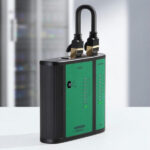
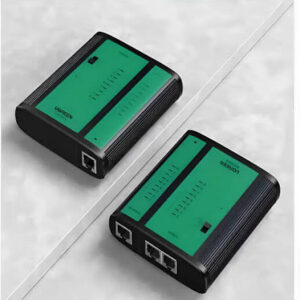
The UGREEN NW167 Network Cable Tester is a compact cable-testing tool designed to check the wiring and continuity of common RJ45 Ethernet cables and RJ11/RJ12 telephone cables.
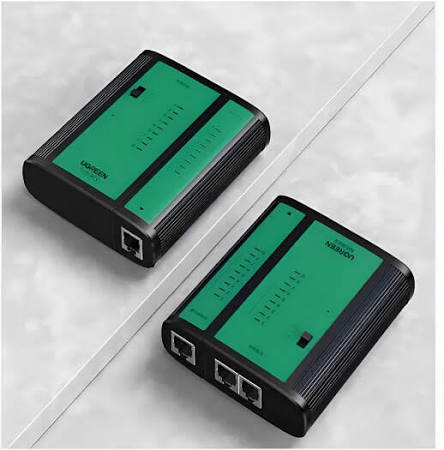
Also identified by product number 10950, the NW167 uses a main testing unit and detachable remote unit, allowing you to test both ends of a cable even when the cable is installed between different rooms, wall outlets or network points. Its LED indicators make it easier to identify the sequence of individual conductors and detect common wiring problems.
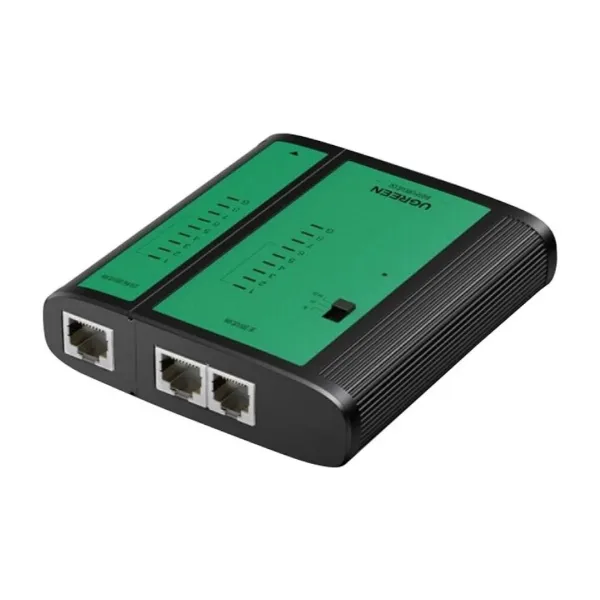
The tester supports RJ45 8P8C network connections and RJ12/RJ11-family 6P6C, 6P4C and 6P2C telephone connections. It is intended for basic continuity and wiring troubleshooting rather than network-speed measurement or professional cable certification.
Common Problems with Network & Telephone Cables
Cable problems are not always visible from the outside.
Common wiring issues include:
- Broken or disconnected conductors
- Incorrect wire order
- Crossed wires
- Poorly terminated RJ45 connectors
- Faulty RJ11/RJ12 connections
- Miswired patch cables
- Installation errors inside walls
- Difficulty identifying which cable is faulty
Testing a cable before connecting it to networking or telephone equipment can help identify basic wiring problems quickly.
Smart Solution: UGREEN NW167 Cable Tester
The UGREEN NW167 provides a simple visual way to check cable wiring.
How It Works
Connect Cable → Start Test → LEDs Scan Conductors → Compare Main & Remote Sequences → Identify Wiring Fault
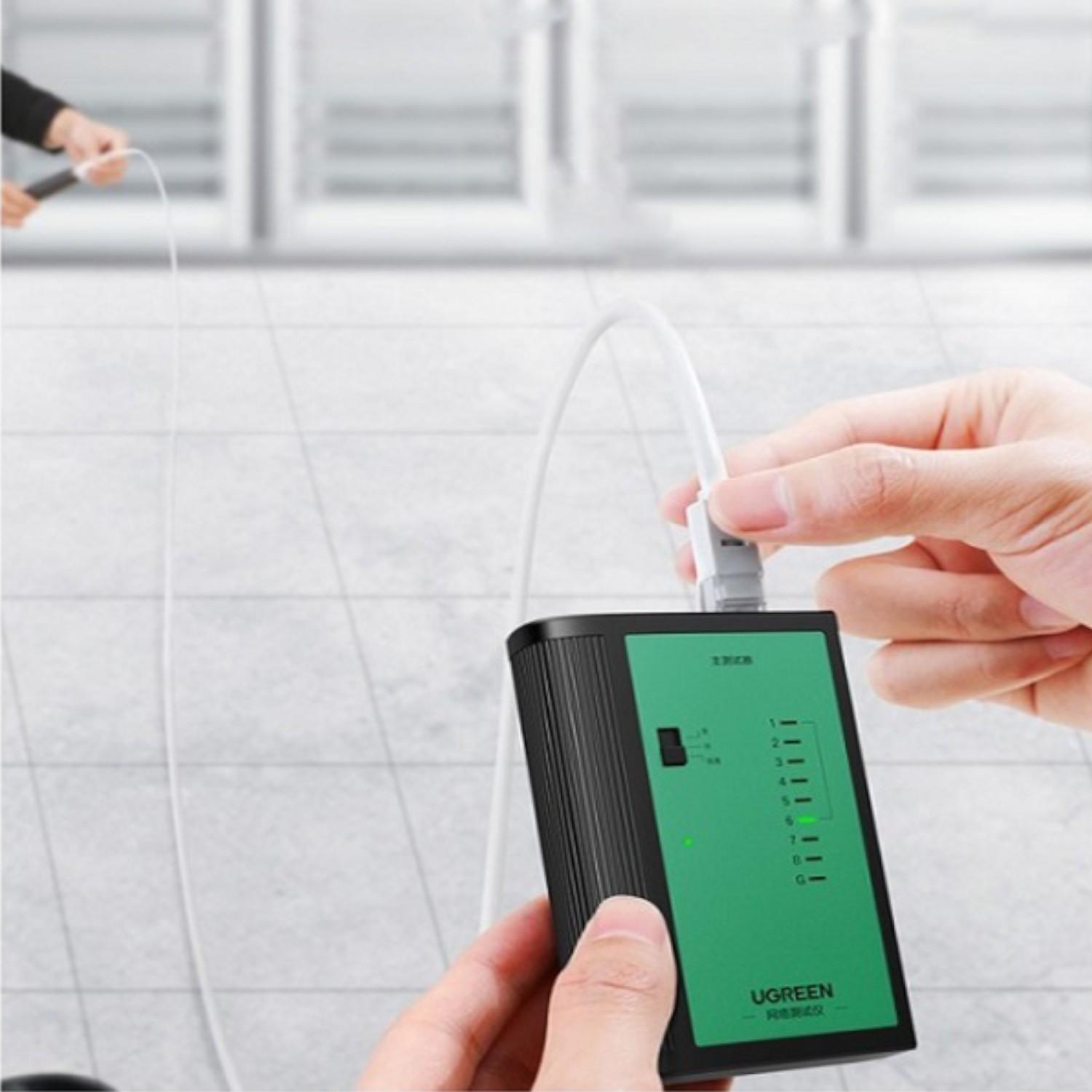
The detachable remote unit can be placed at the opposite end of an installed cable while the main tester remains at the other end. This makes the tester particularly useful for network installations, office cabling and home troubleshooting.
Key Features
1. RJ45 Network Cable Testing
The NW167 supports RJ45 8P8C network cables, making it suitable for checking common Ethernet cable wiring.
It can be used with compatible network cables such as Cat5, Cat5e, Cat6 and other RJ45-terminated cables.
2. RJ11 & RJ12 Telephone Cable Testing
The tester also supports telephone-style connections including:
- RJ12 6P6C
- RJ11 6P4C
- RJ11 6P2C
This makes the NW167 useful for both network and telephone wiring checks.
3. Detachable Remote Unit
The main tester and remote unit can be separated.
This is particularly useful when testing cables installed through:
- Walls
- Ceilings
- Offices
- Server rooms
- Network cabinets
- Telephone outlets
The remote can be connected at the far end while the main tester is operated from the near end.
4. LED Wiring Indicators
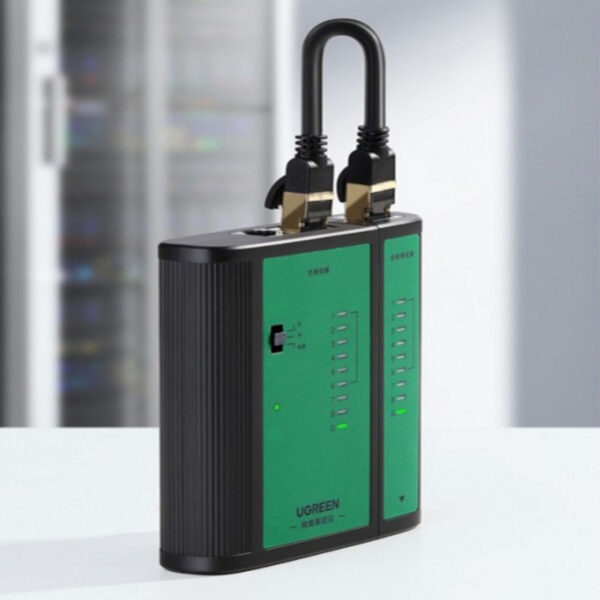
The NW167 uses visible LED indicators to display the conductor sequence.
By comparing the LED sequence between the main unit and remote unit, users can identify wiring problems more easily.
The tester is designed to help identify conditions such as open, short and crossover wiring faults.
5. Fast & Slow Testing Modes
The NW167 provides different scanning speeds.
A slower scan can make individual LED sequences easier to observe, while the faster mode can speed up routine cable checks.
6. Continuity & Wiring Fault Detection
The tester is useful for checking basic cable wiring and identifying common faults such as:
- Open circuits
- Short circuits
- Crossed wires
- Incorrect conductor sequence
This makes it useful during cable installation and troubleshooting.
7. Gold-Plated Contacts
The connector contacts are listed as gold-plated, helping provide durable electrical contact and resistance to oxidation during repeated use.
8. Portable Design
The compact main-and-remote configuration makes the tester convenient for carrying between:
- Offices
- Network cabinets
- Construction sites
- Homes
- Server rooms
- Installation projects
9. 9V Battery Powered
The NW167 operates using a replaceable 9V rectangular battery.
Battery inclusion can vary by regional package, so customers should verify the exact retail package before ordering.
Benefits
- Test RJ45 LAN cables
- Test RJ11 telephone cables
- Test RJ12 telephone cables
- Detect basic wiring faults
- Check conductor continuity
- Identify crossover wiring
- Use detachable remote for installed cables
- Visible LED indicators
- Fast and slow scanning
- Compact portable design
- Gold-plated contacts
- Suitable for technicians and DIY users
- 9V battery operation
Perfect For
The UGREEN NW167 Network Cable Tester is suitable for:
- Network technicians
- IT support professionals
- Electricians
- CCTV installers
- Network installers
- Home networking enthusiasts
- Office IT teams
- Telephone cable technicians
- DIY users
- Students learning network cabling
Why Choose UGREEN NW167?
A cable can look perfectly normal while having an incorrect conductor sequence or a broken connection.
The NW167 provides a straightforward way to check the wiring before connecting a cable to networking or telephone equipment.
Its combination of RJ45 and RJ11/RJ12 support, detachable remote unit and LED sequence indicators makes it a practical troubleshooting tool for everyday cable installations.
UGREEN NW167 vs Basic Cable Checking
| Feature | UGREEN NW167 | Visual Cable Inspection |
|---|---|---|
| RJ45 Testing | Yes | No |
| RJ11 Testing | Yes | No |
| RJ12 Testing | Yes | No |
| Continuity Check | Yes | No |
| Open Fault Detection | Yes | No |
| Short Fault Detection | Yes | No |
| Crossover Detection | Yes | No |
| LED Indicators | Yes | No |
| Detachable Remote | Yes | No |
| Fast/Slow Scan | Yes | No |
| Battery Powered | 9V | Not Applicable |
How to Use UGREEN NW167 Network Cable Tester
Step 1: Disconnect the Cable
Before testing, disconnect the cable from routers, switches, PoE equipment, telephone systems and other powered equipment.
Never connect the tester directly to an energized network or telephone circuit.
Step 2: Install the Battery
Install a compatible 9V rectangular battery into the tester with the correct polarity.
Step 3: Connect the Cable
For a standard patch cable, connect one end to the main tester and the other end to the detachable remote unit.
Step 4: Test an Installed Cable
For an installed cable run, connect the main tester at one end and place the detachable remote unit at the other end.
Step 5: Select the Test Speed
Choose the normal/slow or fast scanning mode according to your preference.
Step 6: Watch the LED Sequence
Observe the LED sequence on the main and remote units.
Compare the conductor order with the expected wiring configuration.
Step 7: Diagnose the Cable
An incorrect or missing LED sequence may indicate a wiring problem such as an open, short or crossed conductor.
Step 8: Reconnect the Cable
After testing is complete, disconnect the tester and reconnect the cable to the appropriate networking or telephone equipment.
Use Cases
Ethernet Cable Testing
Check newly terminated RJ45 cables before installing them into routers, switches or patch panels.
Network Installation
Use the detachable remote unit to check installed cables running through walls, ceilings or offices.
Telephone Cable Testing
Test compatible RJ11 and RJ12 telephone wiring for continuity and conductor order.
Office Troubleshooting
Quickly identify potentially faulty cables when troubleshooting network connectivity.
Home Networking
Check DIY-made Ethernet cables before connecting computers, routers, switches or other equipment.
Cable Crimping
After crimping RJ45 connectors, use the NW167 to verify that the conductor sequence is correct.
Cleaning & Maintenance
To keep the tester working reliably:
- Keep the tester dry.
- Store it in a clean location.
- Avoid dropping the main or remote unit.
- Keep connector contacts free from dirt.
- Remove the battery during long-term storage if appropriate.
- Replace the battery when LED indicators become weak.
- Avoid forcing connectors into incompatible ports.
- Keep the main and remote units together when not in use.
Important Usage Tips
- Never connect the tester to a live Ethernet or telephone circuit.
- Disconnect cables from switches, routers and PoE equipment before testing.
- Do not use the tester as a network-speed measurement device.
- Do not assume that a continuity pass guarantees Gigabit Ethernet performance.
- Check the connector type before inserting a cable.
- Do not force RJ11/RJ12 plugs into incompatible equipment.
- Replace the 9V battery when necessary.
- Store the tester away from excessive moisture and heat.
Important: Cable Tester vs Cable Certifier
The UGREEN NW167 is a basic wiring and continuity tester.
It can help identify problems such as open circuits, short circuits and crossover/misordered conductors. However, it does not certify whether a cable meets Cat5e, Cat6, Cat7 or Cat8 performance standards.
It does not measure:
- Ethernet bandwidth
- Network throughput
- Insertion loss
- Return loss
- Crosstalk performance
- PoE load
- Distance to cable faults
- Professional cable-certification parameters
For professional standards certification, a dedicated calibrated cable certifier is required.
Product Specifications
| Specification | Details |
|---|---|
| Brand | UGREEN |
| Model | NW167 |
| Product Number | 10950 |
| Product Type | Network & Telephone Cable Tester |
| RJ45 Interface | 8P8C |
| RJ12 Interface | 6P6C |
| RJ11 Support | 6P4C / 6P2C |
| Network Cable | RJ45 Ethernet |
| Telephone Cable | RJ11 / RJ12 |
| Supported Cable Types | 8P8C, 6P6C, 6P4C, 6P2C |
| Fault Detection | Open, Short & Crossover |
| Test Indication | LED Sequence |
| Test Modes | Fast / Slow |
| Main Unit | Yes |
| Remote Unit | Detachable |
| Contact Finish | Gold-Plated |
| Housing | PC + ABS |
| Power | 1 × 9V Replaceable Battery |
| Color | Black |
| Warranty | Depends on regional seller |
| Dimensions | Vary by regional listing |
UGREEN regional documentation lists NW167/10950 with PC+ABS construction, gold-plated contacts and a replaceable 9V battery. Published dimensions vary between regional listings, so the exact seller specification should be checked before publishing a fixed size.
What’s in the Box?
Typical package contents include:
- 1 × UGREEN NW167 Main Tester
- 1 × Detachable Remote Tester
- User Documentation
Some regional listings include a 9V battery, while others state that the battery is not included. Confirm the exact AIYOZON package before listing it as included.
Who Should Buy This Product?
Choose the UGREEN NW167 Network Cable Tester if you need:
- A simple RJ45 cable tester
- RJ11/RJ12 telephone cable testing
- Basic continuity testing
- Open and short fault detection
- Crossover detection
- LED-based wiring identification
- A detachable remote unit
- A portable troubleshooting tool
- A cable tester for home or professional installation work
If you need detailed Cat6/Cat7/Cat8 certification or network-performance measurements, choose a professional cable certification tester instead.
Why Buy from AIYOZON?
When purchasing the UGREEN NW167 Network Cable Tester from AIYOZON, you can enjoy:
- Genuine UGREEN product-focused shopping
- Clear product specifications
- Convenient online ordering
- Product assistance
- Reliable delivery options
- Customer support
Frequently Asked Questions
What is the UGREEN NW167?
The UGREEN NW167 is a network and telephone cable tester designed to check wiring continuity and identify basic faults in compatible RJ45, RJ11 and RJ12 cables.
What is the model number?
The model is NW167, and the commonly associated UGREEN product number is 10950.
Can it test RJ45 Ethernet cables?
Yes. It supports RJ45 8P8C network cables.
Can it test RJ11 cables?
Yes. The tester supports RJ11-family telephone wiring in 6P4C and 6P2C configurations.
Can it test RJ12 cables?
Yes. It supports RJ12 6P6C telephone cables.
What faults can it detect?
It can help identify open circuits, short circuits and crossover/misordered wiring through its LED test sequence.
Does it have a detachable remote?
Yes. The main tester and remote unit can be separated, which is useful for testing installed cables where the two ends are far apart.
Does it require a battery?
Yes. The NW167 uses a 9V rectangular battery. Battery inclusion varies by region and seller.
Can it test Cat6 cables?
Yes, it can check the wiring continuity of compatible RJ45-terminated Cat6 cables. However, it does not certify Cat6 performance or guarantee Gigabit/network performance.
Can it test Cat7 or Cat8 cables?
It can check compatible RJ45 wiring, but this should not be confused with Cat7/Cat8 performance certification. A dedicated cable certifier is required for standards-level certification.
Does it test BNC coaxial cable?
The verified NW167 specifications do not establish a BNC/coaxial testing interface. Therefore, do not advertise BNC testing for this model.
Can I test a cable while it is connected to a router?
No. Disconnect the cable from routers, switches, PoE injectors and other powered equipment before testing.
Can it measure internet speed?
No. The NW167 tests cable wiring; it does not measure internet speed or Ethernet throughput.
Can it locate the exact distance to a cable break?
No. It does not provide a distance-to-fault measurement.
Can one person test an installed cable?
Yes. Place the detachable remote at one end and use the main tester at the other end.
Does a successful cable test guarantee good internet performance?
No. A cable can have correct continuity while still having other problems involving termination quality, interference, impedance or signal performance.
Final Verdict
The UGREEN NW167 Network Cable Tester is a practical tool for checking the basic wiring of RJ45 Ethernet and RJ11/RJ12 telephone cables.
Its detachable remote unit, LED conductor indicators, fast/slow testing modes, open/short/crossover fault detection and 9V battery operation make it useful for network technicians, IT professionals, installers and DIY users.
It is particularly useful when you need to quickly verify a newly crimped cable or troubleshoot an installed cable run. However, it should be viewed as a continuity and wiring tester, not a professional Ethernet cable certification instrument.
🛠️ Test Your Cables Before They Cause Problems
- ✔ RJ45 8P8C Network Cable Testing
- ✔ RJ11/RJ12 Telephone Cable Testing
- ✔ Open & Short Fault Detection
- ✔ Crossover/Wiring Sequence Detection
- ✔ Detachable Remote Unit
- ✔ LED Status Indicators
- ✔ Fast & Slow Test Modes
- ✔ Gold-Plated Contacts
- ✔ 9V Battery Powered
- ✔ Compact & Portable Design












Reviews
There are no reviews yet.