





UGREEN AK701 8K HDMI KVM Switch 4 In 1 Out with USB 3.0 – Powerful 8K 60Hz Switching Solution
Original price was: 16,990.00৳ .14,990.00৳ Current price is: 14,990.00৳ .
UGREEN AK701 8K HDMI KVM Switch 4 In 1 Out with USB 3.0 – Powerful 8K 60Hz Switching Solution
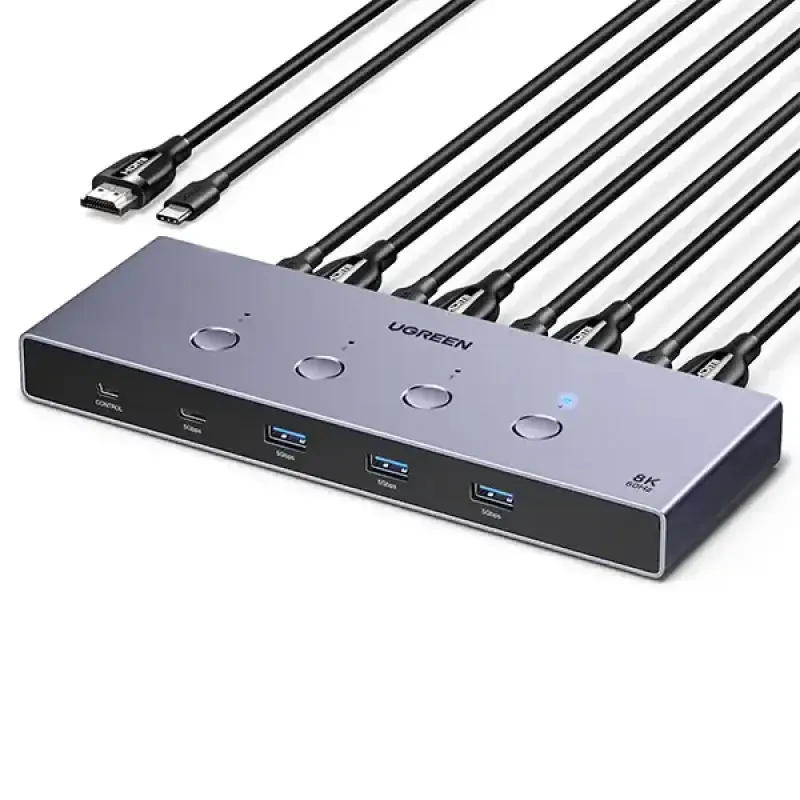
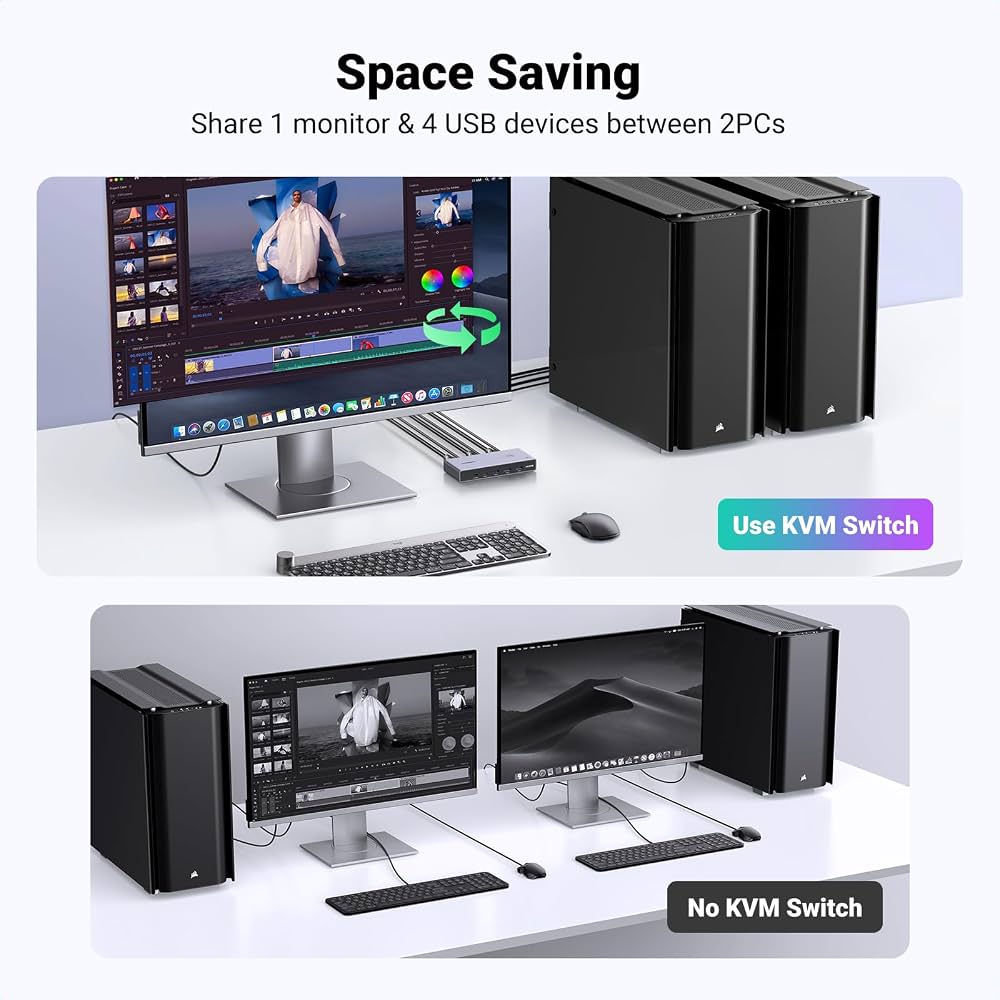
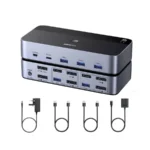
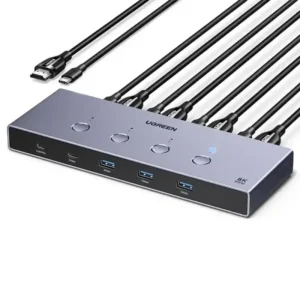
The UGREEN AK701 8K HDMI KVM Switch 4 In 1 Out with USB 3.0 is designed for users who want to control up to four computers or compatible HDMI source devices using one monitor and shared USB peripherals. It helps simplify multi-computer setups by reducing the need to repeatedly reconnect your display, keyboard, mouse, and other accessories.
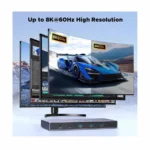
With support for resolutions up to 8K at 60Hz and compatible high-refresh-rate modes such as 4K at 240Hz, this HDMI 2.1 KVM switch is suitable for compatible high-resolution displays, professional workstations, and entertainment setups. Actual video performance depends on the connected devices, cables, and supported display settings.
The UGREEN AK701 also features four USB 3.0 peripheral ports, including three USB-A ports and one USB-C port. These allow you to share compatible accessories, such as a keyboard, mouse, USB storage device, or printer, between the connected computers.
Its physical switching button and wired desktop controller make it convenient to change the active computer. The device supports Windows, macOS, and Linux, making it suitable for many different computer environments.
Whether you work with multiple computers, manage separate work and personal systems, or want a more organised workstation, the UGREEN AK701 offers a practical way to manage your connected devices.
Key Features and Benefits
1. Connect Four Computers to One Monitor
The UGREEN AK701 allows you to connect up to four compatible HDMI source devices to a single monitor. You can select the active source without manually unplugging and reconnecting HDMI cables.
This is particularly useful if you regularly switch between a desktop PC, laptop, secondary computer, or other compatible HDMI device.
Key benefits:
-
Connect up to four HDMI sources.
-
Share one monitor between the connected devices.
-
Switch between sources using physical controls.
-
Reduce cable swapping and desktop clutter.
Only the selected source is displayed on the shared monitor at a time.
2. Stunning 8K Resolution at 60Hz
Enjoy detailed visuals with support for resolutions up to 7680 × 4320 at 60Hz when the connected source, monitor, and cables support this mode.
The high-resolution capability makes the switch suitable for compatible 8K displays and demanding visual environments. It also supports compatible lower-resolution display modes.
For the best results, use suitable HDMI cables and ensure that every device in the video connection supports your intended resolution and refresh rate.
3. Supports Compatible 4K at 240Hz
For users who prioritise smooth motion, the UGREEN AK701 supports compatible high-refresh-rate display modes, including 4K at 240Hz.
This can be useful for supported gaming systems and high-refresh-rate monitors. However, the actual refresh rate depends on the connected computer or device, monitor, cable quality, and video settings.
4. HDMI 2.1 Connectivity
The HDMI 2.1 interface supports high-bandwidth video configurations on compatible devices. This helps the switch accommodate demanding display requirements, including supported high resolutions, refresh rates, and HDR content.
For features such as HDR10, HDR10+, and variable refresh rate (VRR), the source device and monitor must also support the relevant feature.
5. Four USB 3.0 Peripheral Ports
The built-in USB hub includes:
-
Three USB-A 3.0 ports
-
One USB-C 3.0 port
These ports let you share supported USB peripherals with the selected computer. Compatible devices may include keyboards, mice, flash drives, external storage, printers, and cameras.
USB 3.0 supports data transfer rates of up to 5Gbps under suitable conditions. Actual speeds depend on the connected devices and available bandwidth.
6. Convenient Physical Switching
Switching between connected computers is straightforward. Use the button on the unit or the supplied wired desktop controller to select the device you want to use.
This is helpful when the KVM switch is placed behind a monitor or underneath a desk.
Note: Keyboard hotkey switching is not supported on this model.
7. Wide Operating System Compatibility
The UGREEN AK701 supports Windows, macOS, and Linux. This makes it suitable for users who operate multiple computers with different operating systems.
Basic KVM switching does not require dedicated software, although individual USB accessories and display features may have their own compatibility requirements.
8. Durable Aluminium-Alloy Housing
The AK701 features an aluminium-alloy housing designed to provide a sturdy enclosure and help dissipate heat.
Its desktop design makes it suitable for home offices, workstations, gaming desks, and other setups where multiple devices need to share a display.
9. Digital Audio and HDR Support
The switch supports compatible HDMI audio formats and HDR-related display features. Depending on the source device and display setup, these capabilities can help preserve supported audio and visual features when switching between HDMI sources.
The actual audio format and HDR performance depend on the entire connected system.
Why Choose the UGREEN AK701 8K HDMI KVM Switch?
Managing several computers can become inconvenient when every device requires its own monitor and set of peripherals. The UGREEN AK701 helps simplify this arrangement by letting you share one monitor and compatible USB accessories among up to four connected sources.
It is a useful option for:
-
Home office users who work with multiple computers.
-
IT professionals managing different systems.
-
Programmers switching between development environments.
-
Users with compatible gaming PCs and high-refresh-rate displays.
-
Students using separate computers for study and personal tasks.
-
Workstations where reducing cable clutter is important.
The combination of 8K 60Hz support, compatible 4K high-refresh-rate modes, USB 3.0 connectivity, and convenient switching controls makes the UGREEN AK701 a versatile option for a compatible multi-device setup.
Product Specifications
| Specification | Details |
|---|---|
| Brand | UGREEN |
| Model | AK701 |
| Model / Part Number | 55397 |
| Product Type | HDMI KVM Switch |
| Input Configuration | 4 In 1 Out |
| HDMI Inputs | 4 |
| HDMI Output | 1 |
| HDMI Standard | HDMI 2.1 |
| Maximum Listed Resolution | 8K at 60Hz |
| Other Supported Modes | Compatible 4K at 240Hz and lower resolutions |
| HDR Support | HDR10, HDR10+ |
| Other Video Features | 3D, VRR, subject to device compatibility |
| USB-A Ports | 3 × USB 3.0 |
| USB-C Port | 1 × USB 3.0 peripheral port |
| USB Data Transfer Speed | Up to 5Gbps |
| Switching Methods | Physical button and wired desktop controller |
| Hotkey Switching | Not supported |
| Operating Systems | Windows, macOS, Linux |
| Housing Material | Aluminium alloy |
| Power Input | USB-C, 5V ⎓ up to 4A |
| Audio Support | Compatible HDMI audio formats |
| Installation | Basic plug-and-play operation |
Specifications and included accessories may vary by seller or package. Confirm the exact model and contents before purchasing.
Practical Uses of the UGREEN AK701
Home Office and Remote Work
Connect multiple computers to one monitor and switch between them as needed. This helps users manage work systems and personal computers without constantly changing HDMI connections.
Business and Office Workstations
The AK701 can simplify setups where staff need access to multiple computers but prefer to share one display and USB peripherals.
IT Administration
IT professionals can switch between compatible computers used for configuration, troubleshooting, monitoring, and other technical tasks.
Gaming and Entertainment
Use the switch with compatible HDMI gaming systems and displays. Supported 4K high-refresh-rate modes can be useful when the source device and monitor support the required settings.
Content Creation
Users working with photo editing, video production, and other creative applications can switch between different computers without repeatedly reconnecting the monitor.
Study and Personal Computing
Students and home users can share a monitor and compatible peripherals among multiple computers, helping keep a desk organised.
How to Set Up the UGREEN AK701
-
Position the switch: Place the KVM switch on a stable surface near your computers and monitor.
-
Connect your HDMI sources: Connect each computer or compatible HDMI device to one of the four HDMI inputs.
-
Connect the USB host cables: Follow the product manual to connect the required USB host connection for each computer you want to use with the shared peripherals.
-
Connect the monitor: Connect your monitor to the switch’s HDMI output.
-
Connect USB peripherals: Plug your compatible keyboard, mouse, and other USB accessories into the USB-A or USB-C peripheral ports.
-
Connect power: Use the recommended USB-C power supply for the exact model.
-
Select a source: Use the physical button or wired desktop controller to select the active computer.
-
Adjust display settings: Set the resolution and refresh rate supported by your computer, monitor, and HDMI connection.
For 8K 60Hz or high-refresh-rate 4K output, use suitable cables and confirm that all connected equipment supports the desired video mode.
Compatibility and Important Notes
Before purchasing the UGREEN AK701, consider these important details:
-
One monitor output: The 4 In 1 Out configuration connects four sources to one display.
-
One active source at a time: It does not display all four computers simultaneously on the same monitor.
-
USB peripheral sharing: Connect the required USB host cables to enable supported peripherals to follow the selected computer.
-
8K requires compatible hardware: Your source device, monitor, and cables must support 8K 60Hz.
-
High refresh rates depend on the complete setup: A compatible monitor alone is not enough; the source and cables must also support the selected mode.
-
USB-C port purpose: The downstream USB-C port is for compatible USB peripherals. Do not assume it provides video input or laptop charging.
-
No keyboard hotkeys: Switch using the physical button or supplied desktop controller.
-
Power supply: Use a suitable power source according to the model’s specifications.
-
HDMI compatibility: Check your source device’s output requirements and any required HDCP or HDR compatibility before connecting protected content.
These checks help ensure that the switch is suitable for your devices and intended use.
UGREEN AK701 vs. a Standard HDMI Switch
| Feature | UGREEN AK701 KVM Switch | Standard HDMI Switch |
|---|---|---|
| HDMI source inputs | 4 | Depends on the model |
| Monitor outputs | 1 | Usually 1 |
| Shared USB peripherals | Yes | Usually not |
| Maximum listed resolution | Up to 8K at 60Hz | Depends on the model |
| USB 3.0 hub | Yes | Usually not |
| Switching controls | Button and wired controller | Usually a button or remote |
| Best use | Multiple computers sharing a monitor and USB accessories | Switching HDMI video sources |
Which should you choose? If you only need to switch the picture between HDMI devices, a standard HDMI switch may be sufficient. If you also want to share a keyboard, mouse, and other compatible USB peripherals between computers, the UGREEN AK701 provides additional functionality.
Care and Safety Tips
-
Keep the switch in a dry, well-ventilated area.
-
Use compatible HDMI and USB cables.
-
Avoid pulling cables by their connectors.
-
Use the recommended power supply.
-
Keep liquids away from the device.
-
Avoid sharply bending HDMI cables.
-
Check the selected source if the monitor displays no signal.
-
If 8K or a high refresh rate is unavailable, check the source device, cables, monitor settings, and supported resolution.
Why Buy from AIYOZON?
AIYOZON helps customers find useful technology accessories for home, office, and professional setups. The UGREEN AK701 is an option for users who want to manage multiple HDMI sources through one monitor while sharing compatible USB peripherals.
Before ordering from AIYOZON, review the product specifications, confirm device compatibility, and check the current price, warranty, stock availability, and delivery terms.
Frequently Asked Questions
1. What is the UGREEN AK701 8K HDMI KVM Switch?
The UGREEN AK701 is a 4 In 1 Out HDMI KVM switch that lets you connect up to four compatible HDMI source devices to one monitor and share supported USB peripherals.
2. Does the UGREEN AK701 support 8K at 60Hz?
Yes. The model 55397 is listed with support for up to 8K at 60Hz, provided the connected source device, monitor, and cables support the required mode.
3. Can I connect four computers to the UGREEN AK701?
Yes. You can connect up to four compatible computers or HDMI source devices. You can then select which source appears on the shared monitor.
4. How many USB ports does the UGREEN AK701 have?
It has four USB 3.0 peripheral ports: three USB-A ports and one USB-C port. These support compatible USB accessories and data transfer up to 5Gbps under suitable conditions.
5. Does it support Windows, macOS, and Linux?
Yes. The UGREEN AK701 supports Windows, macOS, and Linux. Compatibility with specific peripherals and display features depends on the connected equipment.
6. Can I use the UGREEN AK701 for gaming?
It can be used with compatible gaming computers and HDMI devices. It supports up to 8K 60Hz and compatible high-refresh-rate modes, including 4K 240Hz, when the source device, cables, and monitor support them.
7. How do I switch between connected devices?
You can use the physical button on the KVM switch or the supplied wired desktop controller. Keyboard hotkey switching is not supported.
8. How long does delivery take from AIYOZON?
Typical estimated delivery times are:
-
Inside Dhaka: 24–48 Hours
-
Outside Dhaka: 2–3 Business Days
Delivery times may vary according to location, stock availability, courier service, and the seller’s current shipping policy.
Final Recommendation
The UGREEN AK701 8K HDMI KVM Switch 4 In 1 Out with USB 3.0 is a practical solution for users who want to switch between up to four HDMI source devices using one monitor and shared USB peripherals. Its 8K 60Hz support, compatible 4K high-refresh-rate modes, four USB 3.0 ports, and convenient switching controls make it suitable for compatible home offices, professional workstations, and entertainment setups.
If you want to reduce cable swapping and simplify a multi-computer workspace, the UGREEN AK701 is worth considering.













Reviews
There are no reviews yet.