





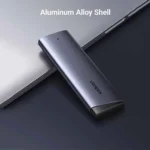

UGREEN CM578 (15512) M.2 NVMe SSD Enclosure 10Gbps – Tool-Free USB-C External SSD Case
Original price was: 3,000.00৳ .2,590.00৳ Current price is: 2,590.00৳ .
UGREEN CM578 (15512) M.2 NVMe SSD Enclosure 10Gbps – Tool-Free USB-C External SSD Case
The UGREEN CM578 (15512) M.2 NVMe SSD Enclosure is a compact external storage solution designed to turn a compatible internal M.2 NVMe SSD into a portable USB-C drive. Featuring a USB 3.2 Gen 2 interface with transfer speeds of up to 10Gbps, it is suitable for file transfers, backups, work projects and carrying large files between compatible devices.
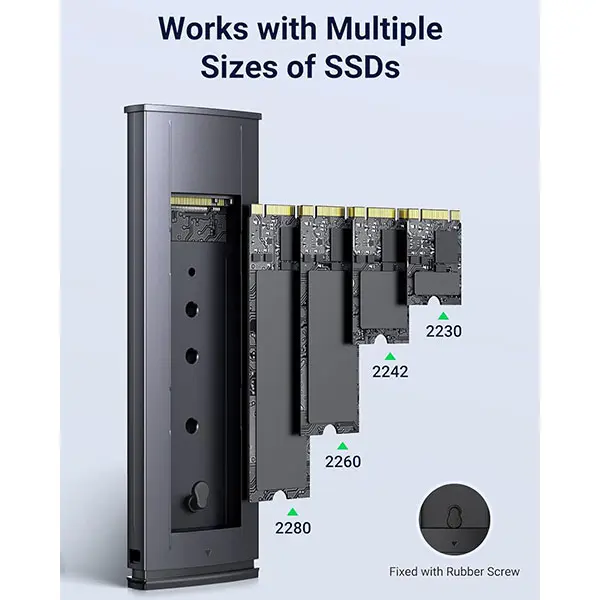
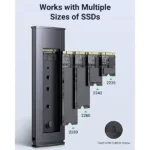
Its tool-free installation design supports M.2 NVMe SSDs in 2230, 2242, 2260 and 2280 sizes. The enclosure combines an aluminum alloy housing, a thermal pad and a protective silicone sleeve to help manage heat and provide additional protection during everyday transport. The included USB-C-to-USB-C and USB-C-to-USB-A cables offer convenient connection options for compatible computers and other supported hosts.
Important compatibility note: This model supports PCIe NVMe SSDs only. It does not support M.2 SATA/NGFF SSDs, even if the drive looks similar or has a compatible-looking notch pattern.
Common Problems with External Storage
Managing digital files can become inconvenient when your computer has limited storage or you need to move large amounts of data between devices.
Common problems include:
- Limited internal laptop or desktop storage
- Slow file transfers with older interfaces
- Difficulty reusing an internal SSD externally
- Complicated installation involving small screws
- Heat buildup during extended file transfers
- Limited connection options for different computers
- Carrying important files between workstations
The UGREEN CM578 provides a convenient way to use a compatible M.2 NVMe SSD as portable external storage.
Smart Solution: Turn an NVMe SSD into Portable Storage
Install a compatible NVMe SSD inside the UGREEN CM578 enclosure and connect it to a supported host through USB.
You can use the resulting external drive for:
- Large file transfers
- Document and media backups
- Moving project files between computers
- Expanding available storage
- Transferring photos and videos
- Accessing files on compatible USB-storage devices
The enclosure supports UASP and TRIM where the host system and drive support these features. Actual performance depends on the installed SSD, host USB port, cable, workload and system configuration.
Key Features
1. High-Speed 10Gbps USB 3.2 Gen 2 Interface
The CM578 supports USB 3.2 Gen 2 connectivity with a maximum link speed of 10Gbps. This provides a high-bandwidth connection for transferring large files and accessing data on a compatible NVMe SSD.
The 10Gbps figure represents the interface’s theoretical signalling rate, not a guaranteed file-copy speed. Actual read and write performance varies according to the SSD and connected device.
2. Supports Four M.2 SSD Lengths
The enclosure accommodates compatible NVMe SSDs in these standard sizes:
- 2230 – 22mm wide × 30mm long
- 2242 – 22mm wide × 42mm long
- 2260 – 22mm wide × 60mm long
- 2280 – 22mm wide × 80mm long
This range supports many common M.2 NVMe drives, provided the SSD uses a supported connector and protocol.
3. NVMe-Only Compatibility
The CM578 is designed for PCIe NVMe M.2 SSDs using supported M-key or M+B-key configurations.
It is not compatible with M.2 SATA/NGFF drives. Check the SSD’s technical specifications before purchasing instead of relying on its physical shape alone.
4. Up to 8TB Listed Capacity
The current product listing specifies support for compatible SSDs with capacities of up to 8TB. The actual usable capacity will depend on the installed drive, operating system and partition or file-system configuration.
5. Tool-Free Installation
The push-and-slide enclosure design makes SSD installation straightforward without requiring a conventional screwdriver for the main installation process.
Insert the compatible SSD into the internal connector, secure it using the supplied fixing component, apply the thermal pad as instructed and close the enclosure.
6. Aluminum Alloy Heat Dissipation
The aluminum housing helps conduct heat away from the SSD and enclosure electronics. The included thermal pad helps transfer heat from the drive toward the housing.
This design assists with thermal management, although it cannot eliminate heat buildup or guarantee that an SSD will never throttle during prolonged heavy use.
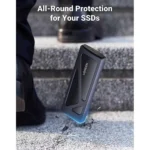
7. Protective Silicone Sleeve
The removable silicone sleeve provides an additional layer of protection against everyday scuffs and minor impacts while carrying the enclosure.
It does not make the device waterproof, crushproof or immune to damage from significant drops.
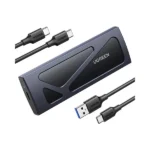
8. USB-C to USB-C and USB-C to USB-A Cables
The listed package includes two connection options:
- USB-C to USB-C cable
- USB-C to USB-A cable
These help connect the enclosure to compatible USB-C or USB-A host ports. The maximum speed still depends on the capabilities of the host port and the complete connection.
9. UASP and TRIM Support
The enclosure lists support for UASP and TRIM where supported by the installed SSD and host system. These storage features can help improve data-transfer handling and SSD maintenance in compatible configurations.
10. Broad Operating System Compatibility
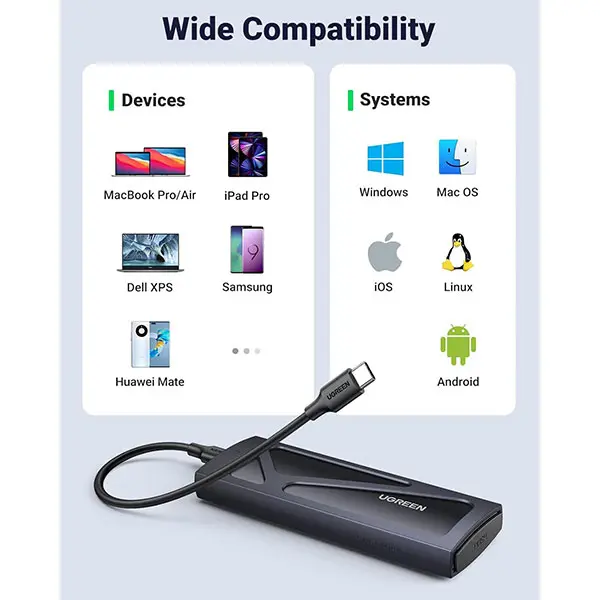
The CM578 is listed for use with Windows, macOS and Linux, with Android support on compatible devices. Mobile use requires a host that supports USB data/OTG storage access and provides sufficient power; compatibility is not universal.
Benefits of UGREEN CM578 SSD Enclosure
- Up to 10Gbps USB 3.2 Gen 2 interface
- Supports compatible M.2 NVMe SSDs
- Fits 2230, 2242, 2260 and 2280 SSD lengths
- Listed capacity support up to 8TB
- Tool-free installation
- Aluminum alloy housing for heat dissipation
- Thermal pad included
- Protective silicone sleeve
- USB-C-to-USB-C and USB-C-to-USB-A cables
- UASP and TRIM support where compatible
- Portable design for everyday storage tasks
- Useful for backups, file transfers and storage expansion
Perfect For
Laptop Users
Add external storage for documents, media, software projects and other files when your laptop’s internal storage is limited.
Desktop PC Users
Access a compatible NVMe SSD externally without installing it directly into a computer’s motherboard.
Content Creators
Transfer and organize large photo, video and project files, subject to the speed of the SSD and connected system.
Students and Professionals
Carry presentations, documents, research files and other data between compatible workstations.
IT Technicians
Use a compatible NVMe drive externally for file access, maintenance and storage workflows. This enclosure does not itself repair failed drives or guarantee data recovery.
Why Choose UGREEN CM578?
The UGREEN CM578 combines a high-speed USB interface, tool-free installation and portable construction in one enclosure. Its support for four common NVMe SSD lengths makes it useful for people who want to reuse a compatible internal SSD as external storage.
The aluminum housing, thermal pad and silicone sleeve add practical features for everyday use, while the two included cable types provide flexibility when connecting to different host ports.
UGREEN CM578 vs. a Traditional External Hard Drive
| Feature | UGREEN CM578 with Compatible NVMe SSD | Traditional External HDD |
|---|---|---|
| Storage medium | User-installed NVMe SSD | Usually included HDD |
| Connection | USB-C, USB 3.2 Gen 2 | Depends on model |
| Maximum interface speed | Up to 10Gbps | Depends on model |
| Installation | Tool-free SSD installation | Usually ready to use |
| Storage capacity | Depends on SSD; listed up to 8TB | Depends on model |
| Moving parts | No moving parts in the SSD | HDD contains moving parts |
| Portability | Compact enclosure | Varies |
| SSD included | No | Usually included |
| Best for | Reusing NVMe SSDs as external storage | Ready-made external storage |
The comparison is general; actual performance and capacity depend on the selected drive and product model.
How to Install and Use UGREEN CM578
Step 1: Check Your SSD
Confirm that your drive is a PCIe NVMe M.2 SSD in size 2230, 2242, 2260 or 2280. M.2 SATA drives are not supported.
Step 2: Open the Enclosure
Slide open the enclosure according to the product instructions to access the internal SSD connector.
Step 3: Insert the SSD
Gently insert the compatible SSD into the M.2 connector, ensuring that it is fully seated.
Step 4: Secure the Drive
Use the supplied fixing component and thermal pad as directed in the manual. Make sure the drive is secured correctly before closing the enclosure.
Step 5: Close the Enclosure
Reassemble the enclosure and fit the protective silicone sleeve if desired.
Step 6: Connect to Your Device
Use the USB-C-to-USB-C or USB-C-to-USB-A cable that matches your host port.
Step 7: Initialize or Format if Necessary
If the SSD is new and does not appear in File Explorer or Finder, it may need to be initialized, partitioned or formatted. Formatting erases existing data on the selected drive, so check carefully before proceeding.
Step 8: Eject Before Disconnecting
Close files and applications, then safely eject or unmount the drive before unplugging the cable.
Recommended Use Cases
File Backups
Store copies of important documents and compatible media files on the installed SSD.
Large File Transfers
Move files between computers using the USB interface, with actual speed depending on the SSD and host.
Portable Project Storage
Carry video, design, development or other project files between compatible workstations.
Reusing an Existing SSD
Put a compatible spare NVMe drive to use as an external storage device instead of leaving it unused.
Temporary Storage Expansion
Use the enclosure to add external storage to a compatible computer or device.
Cleaning & Maintenance
- Keep the enclosure dry.
- Clean the exterior with a soft, dry cloth.
- Keep the USB-C connector free from dust and debris.
- Avoid dropping, crushing or bending the enclosure.
- Maintain reasonable airflow during prolonged transfers.
- Check that the SSD and thermal pad are installed correctly if you reopen the enclosure.
- Safely eject the drive before disconnecting it.
- Back up important data regularly.
Important Usage Tips
- Confirm that your SSD uses the NVMe/PCIe protocol, not SATA/NGFF.
- Check the SSD’s length and connector before installation.
- Do not force the SSD into the connector.
- Use a compatible USB data port and cable.
- A 10Gbps port is needed to take advantage of the enclosure’s maximum interface rate.
- Actual transfer speed will be lower than the theoretical link rate and varies by system.
- Do not use the enclosure in wet or excessively humid environments.
- Safely eject the drive before unplugging it.
- Keep a separate backup of important data.
Important: The enclosure is sold without an SSD. You must purchase a compatible M.2 NVMe drive separately.
Product Specifications
| Specification | Details |
|---|---|
| Brand | UGREEN |
| Model | CM578 |
| Product Number | 15512 |
| Product Type | External M.2 NVMe SSD Enclosure |
| Internal SSD Protocol | PCIe NVMe |
| Unsupported Drive Type | M.2 SATA/NGFF |
| Supported SSD Lengths | 2230 / 2242 / 2260 / 2280 |
| Supported Connector Types | Compatible M-key and M+B-key NVMe SSDs |
| External Interface | USB-C |
| USB Standard | USB 3.2 Gen 2 |
| Maximum Interface Speed | Up to 10Gbps |
| Listed Maximum Capacity | Up to 8TB |
| Controller | RTL9210 |
| UASP | Supported where compatible |
| TRIM | Supported where compatible |
| Housing Material | Aluminum alloy |
| Additional Protection | Removable silicone sleeve |
| Cooling | Thermal pad and aluminum housing |
| Cable Length | Approx. 25cm per cable in listed package |
| Dimensions | Approx. 119 × 37 × 12mm |
| Color | Black; verify supplied version |
| Compatible Systems | Windows, macOS, Linux; Android on supported devices |
| SSD Included | No |
| Installation | Tool-free |
| Country of Manufacture | China |
Specifications are consolidated from UGREEN product information, the CM578 manual and retailer listings. Dimensions, included accessories and warranty terms can vary by market or seller; confirm the supplied package before publishing market-specific warranty details.
What’s in the Box?
The listed package contents typically include:
- 1 × UGREEN CM578 M.2 NVMe SSD Enclosure
- 1 × USB-C-to-USB-C cable
- 1 × USB-C-to-USB-A cable
- 1 × Thermal pad
- SSD fixing component(s)
- 1 × Silicone protective sleeve
- 1 × User manual
Note: The M.2 SSD is not included. Package accessories may vary slightly by seller or regional version.
Who Should Buy This Product?
The UGREEN CM578 is a practical choice for people who:
- Own a compatible M.2 NVMe SSD
- Want to reuse an internal SSD as portable storage
- Need a compact external storage enclosure
- Transfer large files regularly
- Want tool-free installation
- Prefer an aluminum enclosure for heat management
- Need USB-C and USB-A connection options
- Want external storage for a compatible computer or mobile device
If you have an M.2 SATA SSD, choose a SATA-compatible enclosure instead.
Why Buy from AIYOZON?
When you purchase the UGREEN CM578 (15512) M.2 NVMe SSD Enclosure from AIYOZON, you can enjoy a convenient shopping experience for practical computer accessories.
- Clear product and compatibility information
- Convenient online ordering
- Product-focused customer support
- Delivery support across Bangladesh
- Useful accessories for laptops, desktops and compatible devices
Check the available warranty and package details on the AIYOZON product page before ordering.
Frequently Asked Questions
What is the UGREEN CM578?
The UGREEN CM578 is a USB-C external enclosure that allows you to use a compatible M.2 NVMe SSD as portable storage. Its product number is 15512.
What is the maximum transfer speed?
It supports a USB 3.2 Gen 2 interface with a theoretical maximum link speed of 10Gbps. Actual file-transfer speeds depend on the SSD, host, cable and workload.
Does it support M.2 SATA SSDs?
No. The CM578 supports PCIe NVMe SSDs, not M.2 SATA/NGFF drives. Always verify the protocol before purchasing.
Which SSD sizes are supported?
It supports compatible M.2 NVMe SSDs measuring 2230, 2242, 2260 and 2280.
Does it support 8TB SSDs?
The current exact-model listing specifies support for compatible SSDs up to 8TB. Confirm the drive and host configuration before purchase.
Is the SSD included?
No. The enclosure is an accessory; you need to install a compatible NVMe SSD separately.
Does it require a screwdriver?
The enclosure uses a tool-free installation design for the main SSD installation process. Follow the supplied instructions and use the included fixing components.
Does it work with a smartphone?
It may work with compatible Android or other USB-storage-capable devices, provided the host supports the required data/OTG functionality, file system and power requirements. Compatibility is not universal.
Why is the enclosure warm during use?
The aluminum housing helps conduct heat away from the SSD and enclosure electronics. Some warmth during transfers can be normal, but persistent disconnections, extreme heat or repeated performance drops should be investigated.
Can it recover data from a damaged SSD?
The enclosure can provide access to an SSD that remains functional and readable, but it cannot repair hardware failure, bypass encryption or guarantee data recovery.
Do I need to format a new SSD?
A new SSD may need initialization, partitioning or formatting before it can store files. Be careful: formatting an existing drive can erase data.
Final Verdict
The UGREEN CM578 (15512) M.2 NVMe SSD Enclosure is a compact and convenient solution for turning a compatible internal NVMe SSD into portable external storage. Its 10Gbps USB 3.2 Gen 2 interface, tool-free installation, four supported M.2 lengths, aluminum housing, thermal pad and silicone sleeve make it suitable for everyday backups, file transfers and storage expansion.
The most important buying consideration is compatibility: this model supports NVMe/PCIe M.2 SSDs only, not SATA/NGFF drives. Check your SSD’s protocol, size and connector before ordering.
Upgrade Your Storage Setup
- 10Gbps USB 3.2 Gen 2 interface
- Supports 2230 / 2242 / 2260 / 2280 NVMe SSDs
- Listed capacity support up to 8TB
- Tool-free installation
- Aluminum alloy housing and thermal pad
- Protective silicone sleeve
- USB-C-to-USB-C and USB-C-to-USB-A cables












Reviews
There are no reviews yet.