



UGREEN 4K@60Hz HDMI Video Capture Card CM410 USB 3.0
6,735.00৳
UGREEN 4K@60Hz HDMI Video Capture Card CM410 USB 3.0
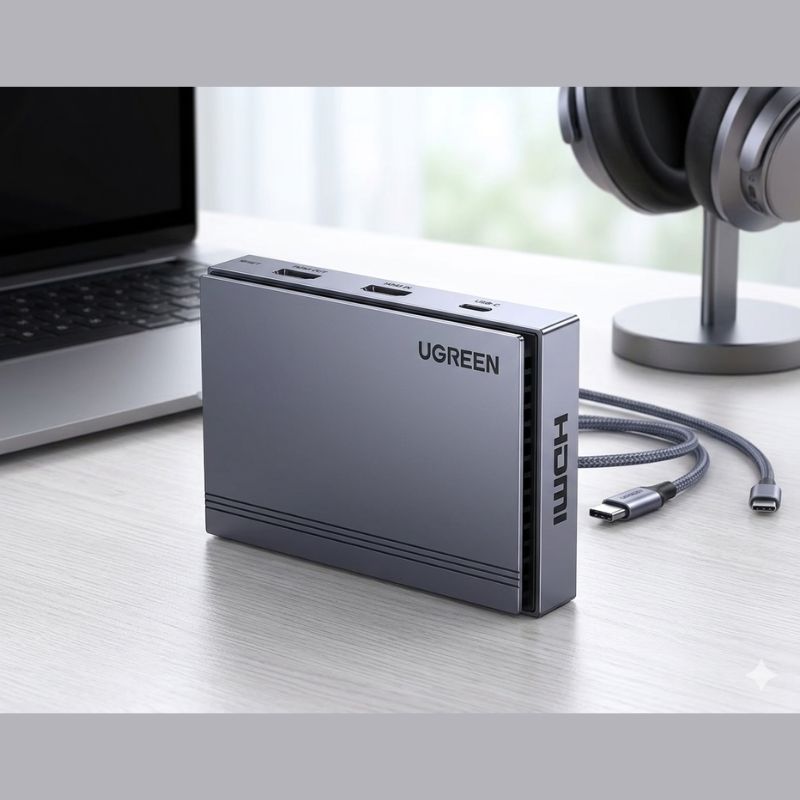
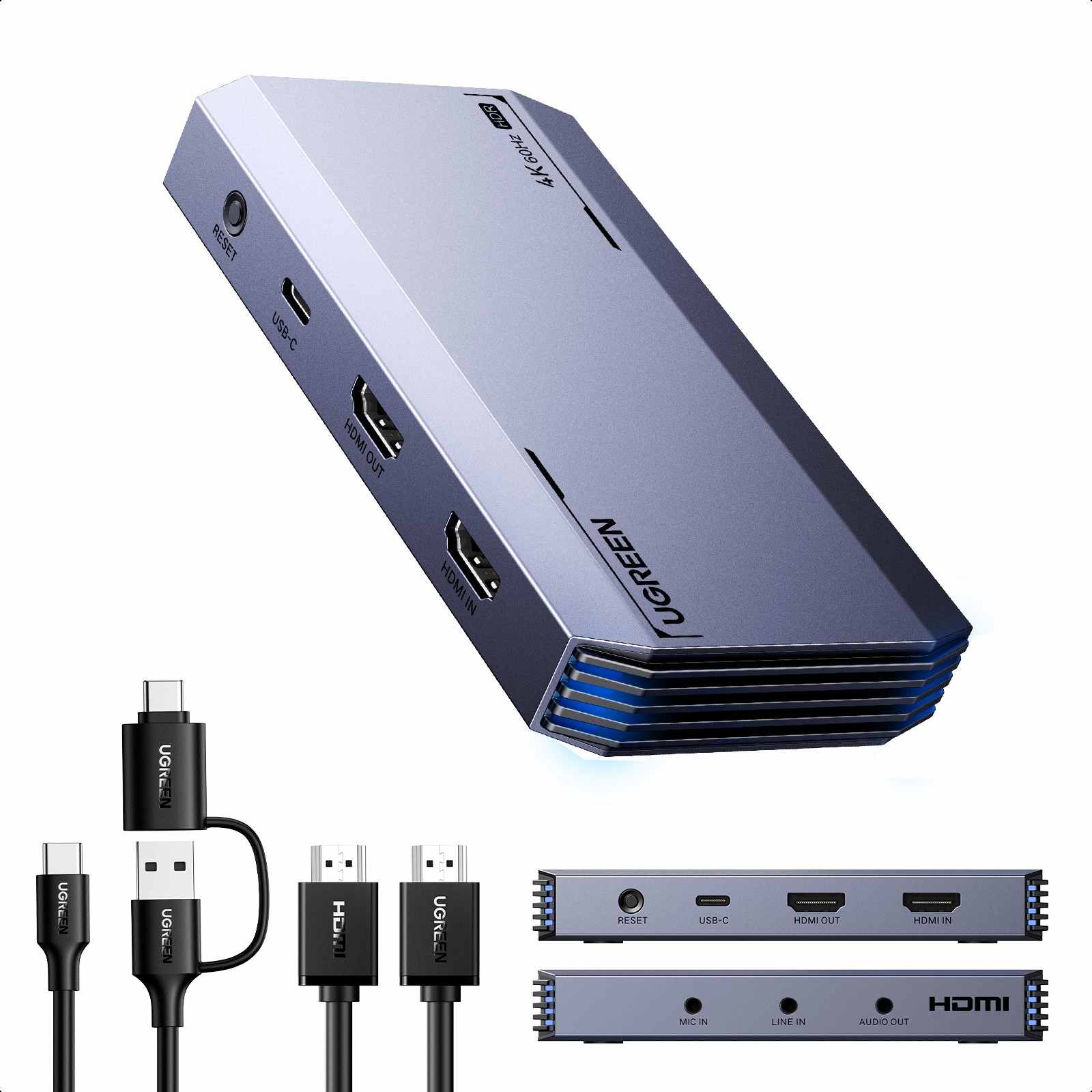
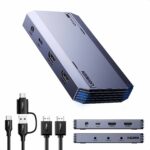
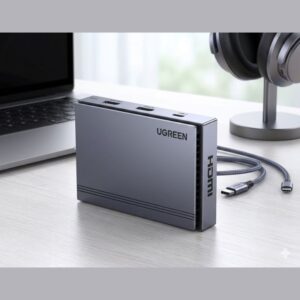
The UGREEN 4K@60Hz HDMI Video Capture Card CM410 (35287) is a versatile capture solution designed for gamers, streamers, content creators, educators and professionals who need to capture HDMI video to a computer while maintaining high-quality passthrough to a display.
The CM410 supports HDMI input up to 4K@60Hz and HDMI loop-out up to 4K@60Hz, allowing you to connect a gaming console, camera or other HDMI source to a monitor or TV while simultaneously sending the captured signal to a computer through USB. The USB capture output supports up to 1080p@60Hz.
It also features a USB 3.0 interface with transfer rates up to 5Gbps, 3.5mm microphone input and 3.5mm audio output for flexible audio recording and monitoring. The device is designed for plug-and-play operation with compatible systems and software such as OBS Studio, XSplit, PotPlayer and QuickTime Player.
Common Problems With Video Recording & Streaming
Recording or streaming HDMI video can become complicated without a dedicated capture device.
- Direct HDMI recording to a computer is not normally available
- High-quality gaming footage may require a separate capture solution
- Monitoring gameplay while recording can be inconvenient
- External microphone integration may require additional hardware
- Some capture devices introduce unnecessary latency
- Switching between recording and display output can be complicated
- Compatibility with streaming software can be an issue
Smart Solution
The UGREEN CM410 provides a convenient bridge between an HDMI source and your computer.
Connect your console, camera or other HDMI source to the HDMI IN port, connect your TV or monitor to HDMI OUT for passthrough, and connect the capture card to your computer through USB 3.0.
This setup lets you monitor your source on a display while capturing video through compatible recording or streaming software.
Key Features
4K@60Hz HDMI Input
The CM410 accepts HDMI video signals up to 4K@60Hz, making it suitable for compatible high-resolution gaming consoles, cameras and other HDMI sources.
4K@60Hz HDMI Loop-Out
The HDMI OUT port supports passthrough up to 4K@60Hz, allowing you to view the source on a compatible monitor or TV while the capture card sends the video signal to your computer.
Up to 1080p@60Hz Capture
Although the HDMI input and loop-out support up to 4K@60Hz, the USB capture output supports up to 1080p@60Hz. This makes the CM410 suitable for smooth Full HD recording and live streaming.
USB 3.0 High-Speed Interface
The USB-C interface uses USB 3.0 and supports transfer speeds of up to 5Gbps, providing a high-speed connection between the capture card and your computer.
Plug & Play Operation
The CM410 is designed for convenient installation without requiring a separate driver installation for supported operating systems. Simply connect the source, display and computer, then select the capture device in compatible software.
3.5mm Microphone Input
A dedicated 3.5mm microphone input allows you to connect an external microphone for voice recording, commentary and live-streaming applications.
3.5mm Audio Output
The dedicated audio output can be used for audio monitoring through compatible headphones or audio equipment.
Low-Latency Video Transmission
The USB 3.0 connection and HDMI passthrough design are intended to provide responsive video monitoring, making the CM410 suitable for gaming and real-time streaming setups.
Broad Software Compatibility
The CM410 is listed as compatible with popular applications including OBS Studio, XSplit, PotPlayer and QuickTime Player.
No External Power Adapter Required
The CM410 is designed to draw power through its USB connection rather than requiring a separate power adapter.
Compact Design
The capture card has a compact body measuring approximately 103 × 57.5 × 20mm, making it convenient for desktop streaming setups and portable recording environments.
Benefits
- Accepts HDMI input up to 4K@60Hz
- Supports 4K@60Hz HDMI passthrough
- Captures video up to 1080p@60Hz
- USB 3.0 interface
- Up to 5Gbps USB transfer rate
- 3.5mm microphone input
- 3.5mm audio output
- Plug-and-play operation
- Works with popular streaming software
- Suitable for gaming and live streaming
- No separate power adapter required
- Compact and portable design
- Supports Windows, macOS and Linux environments
Perfect For
The UGREEN CM410 4K@60Hz HDMI Video Capture Card is ideal for:
- Gamers
- Twitch and YouTube streamers
- Content creators
- Video editors
- Online teachers
- Webinar hosts
- Game recording
- Camera-to-PC video capture
- Live presentations
- Online classes
- Podcast and video production
- Home streaming setups
Why Choose UGREEN CM410?
The UGREEN CM410 is designed for users who need high-resolution HDMI passthrough together with computer-based video capture.
Its ability to accept 4K@60Hz HDMI input and provide 4K@60Hz loop-out means you can continue viewing your source at high resolution on a compatible display while capturing up to 1080p@60Hz through USB.
The additional microphone and audio ports make it particularly useful for streaming, gaming commentary and content creation.
UGREEN CM410 vs Basic HDMI Capture Card
| Feature | UGREEN CM410 | Basic HDMI Capture Card |
|---|---|---|
| HDMI Input | Up to 4K@60Hz | Varies |
| HDMI Loop-Out | Up to 4K@60Hz | Often unavailable |
| USB Interface | USB 3.0 | Often USB 2.0 |
| Capture Resolution | Up to 1080p@60Hz | Varies |
| Microphone Input | 3.5mm | Depends on model |
| Audio Output | 3.5mm | Depends on model |
| Plug & Play | Yes | Depends on model |
| Streaming Software | OBS, XSplit, PotPlayer, QuickTime | Varies |
| External Power | Not required | Varies |
| Best For | Streaming, gaming, recording | Basic capture |
How to Use UGREEN CM410
Step 1: Connect Your HDMI Source
Connect your gaming console, camera or other HDMI source to the HDMI IN port of the CM410.
Step 2: Connect Your Display
Connect the HDMI OUT port to your TV or monitor if you want to use HDMI passthrough for real-time viewing.
Step 3: Connect to Your Computer
Use the USB-C connection on the capture card to connect it to a computer, laptop or compatible device through a USB 3.0 port.
Step 4: Connect a Microphone
If you want to record voice commentary, connect a compatible microphone to the 3.5mm MIC IN port.
Step 5: Connect Headphones or Audio Equipment
Use the 3.5mm audio output for audio monitoring when required.
Step 6: Open Your Capture Software
Launch compatible software such as OBS Studio, XSplit, PotPlayer or QuickTime Player.
Step 7: Select the UGREEN Capture Card
Add the CM410 as your video capture source and configure the desired resolution, frame rate and audio settings.
Step 8: Start Recording or Streaming
Once everything is configured, start your recording, livestream or video production session.
Use Cases
Gaming Streaming
Connect a compatible console to the CM410 and use HDMI passthrough to monitor gameplay while sending the captured signal to your streaming computer.
YouTube Content Creation
Capture gameplay, camera footage, tutorials and other HDMI sources for editing and publishing on YouTube.
Live Streaming
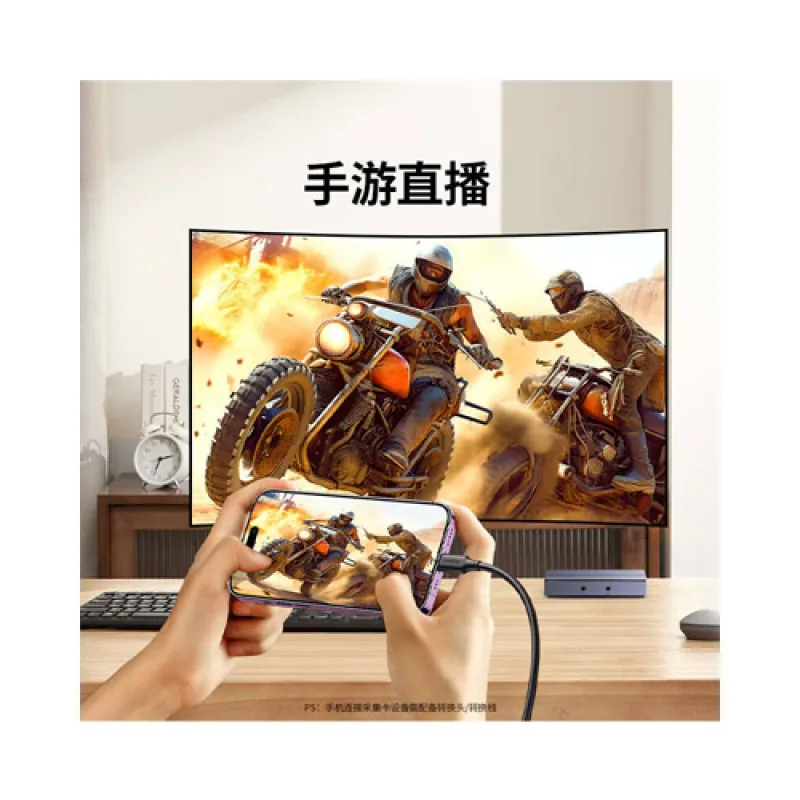
Use OBS Studio or compatible streaming software to broadcast your HDMI source online.
Online Teaching
Capture presentations, cameras or other HDMI equipment for online classes and educational sessions.
Camera Capture
Use a compatible HDMI-output camera as a video source for computer-based streaming, recording or conferencing.
Game Recording
Capture console gameplay in up to 1080p@60Hz through the USB interface while maintaining up to 4K@60Hz HDMI passthrough on a compatible display.
Audio Features
The CM410 provides dedicated audio connectivity for streaming and recording setups.
Microphone Input
Connect an external microphone through the 3.5mm microphone input for commentary, teaching, presentations or live broadcasts.
Audio Monitoring
The 3.5mm audio output can be used to monitor captured audio through compatible headphones or audio equipment.
Compatibility
The CM410 is listed for use with operating systems including Windows, macOS and Linux, with compatible recording and streaming applications such as OBS Studio, XSplit, PotPlayer and QuickTime Player.
Compatible HDMI source examples include:
- Gaming consoles
- Digital cameras
- Camcorders
- HDMI-equipped PCs
- Media devices
- Other compatible HDMI video sources
Always verify the source device’s output format and HDCP status before use.
Important Usage Tips
- Use a USB 3.0 port for optimal capture performance.
- Use suitable HDMI cables for the desired resolution and refresh rate.
- Ensure your computer meets the requirements of your recording software.
- Use compatible HDMI sources that provide a capturable signal.
- Do not expect USB capture output to be 4K just because the HDMI input supports 4K@60Hz.
- For 4K@60Hz passthrough, use compatible HDMI cables and displays.
- Keep the device dry and avoid excessive heat or physical impact.
- Configure the capture resolution and frame rate in your streaming software.
UGREEN documentation notes that HDMI cable length requirements can become more restrictive at higher resolutions; for example, its published guidance recommends cables of up to approximately 3m for 4K@60Hz.
Important HDCP Limitation
The CM410 is intended for capturing compatible HDMI signals and cannot capture HDCP-protected content. Certain game consoles may require HDCP to be disabled for gameplay capture.
This means the device should not be marketed as a tool for capturing protected content from services or devices that enforce HDCP.
Product Specifications
| Specification | Details |
|---|---|
| Brand | UGREEN |
| Model | CM410 |
| Product Number | 35287 |
| Product Type | HDMI Video Capture Card |
| HDMI Input | Up to 4K@60Hz |
| HDMI Loop-Out | Up to 4K@60Hz |
| USB Capture Output | Up to 1080p@60Hz |
| USB Interface | USB 3.0 / USB-C |
| USB Transfer Rate | Up to 5Gbps |
| Microphone Input | 3.5mm |
| Audio Output | 3.5mm |
| Chipset | CH6001 + HMDIN400 + EJ511 |
| Installation | Plug & Play |
| External Power | Not required |
| Compatible Software | OBS Studio, XSplit, PotPlayer, QuickTime Player |
| Operating Systems | Windows, macOS, Linux |
| Dimensions | Approx. 103 × 57.5 × 20mm |
| Color | Black |
| Main Uses | Video Capture, Recording, Streaming |
The CM410 specifications above are based on product listings and documentation for the 35287 version. Some online listings group closely related UGREEN capture-card variants together, so users should verify the model number printed on the product packaging before relying on variant-specific specifications.
What’s in the Box
Typical package contents may include:
- 1 × UGREEN CM410 HDMI Video Capture Card
- 1 × USB-C connection cable
- 1 × User documentation
Package contents can vary by regional packaging or seller. Confirm the exact box contents before purchase.
Who Should Buy This Product?
The UGREEN 4K@60Hz HDMI Video Capture Card CM410 (35287) is suitable for users who want a reliable HDMI capture solution for gaming, streaming, recording and content production.
It is especially suitable for:
- Gamers
- Streamers
- YouTubers
- Video creators
- Online educators
- Camera users
- Webinar presenters
- Home studio users
- Content production teams
Why Buy from AIYOZON?
When you purchase the UGREEN CM410 4K@60Hz HDMI Video Capture Card from AIYOZON, you can conveniently shop for a versatile capture solution for gaming, streaming and video production.
Before placing your order, check the CM410/35287 model number, included accessories, compatibility requirements and warranty terms to ensure the product matches your setup.
Frequently Asked Questions
What is the maximum HDMI input resolution of UGREEN CM410?
The CM410 supports HDMI input up to 4K@60Hz.
Can the UGREEN CM410 capture 4K video?
The CM410 accepts 4K@60Hz HDMI input, but its USB capture output is listed at up to 1080p@60Hz. Therefore, 4K refers to the HDMI input and passthrough capability rather than USB recording output.
Does UGREEN CM410 support 4K passthrough?
Yes. The HDMI OUT/loop-out supports up to 4K@60Hz, allowing compatible displays to receive the original high-resolution signal while the computer captures the video.
Does it support 1080p@60Hz capture?
Yes. The USB capture output supports up to 1080p@60Hz, making it suitable for Full HD gaming streams and recordings.
Does UGREEN CM410 work with OBS Studio?
Yes. OBS Studio is listed among the compatible software applications for the CM410.
Does the CM410 require drivers?
The CM410 is designed for plug-and-play operation on supported systems, so separate driver installation is generally not required.
Can I connect a microphone to the CM410?
Yes. The device includes a dedicated 3.5mm microphone input.
Does the CM410 have audio output?
Yes. It includes a 3.5mm audio output for compatible audio monitoring.
Does UGREEN CM410 need an external power adapter?
No separate power adapter is required; the device operates through its USB connection.
Can I use UGREEN CM410 for PS5 or gaming consoles?
It can be used with compatible HDMI-output gaming devices, but HDCP-protected signals cannot be captured. For supported console gameplay capture, HDCP settings may need to be disabled where the console allows it.
What USB interface does the CM410 use?
The CM410 uses a USB-C connection with USB 3.0, supporting transfer speeds of up to 5Gbps.
Does the CM410 support macOS and Linux?
Yes. Product documentation/listings specify compatibility with Windows, macOS and Linux environments.
Final Verdict
The UGREEN 4K@60Hz HDMI Video Capture Card CM410 (35287) is a versatile solution for gamers, streamers and content creators who need high-quality HDMI passthrough alongside computer-based video capture.
Its 4K@60Hz HDMI input, 4K@60Hz loop-out, 1080p@60Hz USB capture, USB 3.0 interface, microphone input, audio output and plug-and-play design make it suitable for gaming, livestreaming, recording, online teaching and content creation.
🎥 Upgrade Your Streaming & Recording Setup
Turn your HDMI source into a flexible computer-based recording and streaming setup with the UGREEN CM410 4K@60Hz HDMI Video Capture Card.
✔ 4K@60Hz HDMI Input
✔ 4K@60Hz HDMI Loop-Out
✔ Up to 1080p@60Hz USB Capture
✔ USB 3.0 Up to 5Gbps
✔ 3.5mm Microphone Input
✔ 3.5mm Audio Output
✔ Plug & Play Operation
✔ OBS Studio & XSplit Compatible
✔ No External Power Adapter Required










Reviews
There are no reviews yet.