






UGREEN AK700 DisplayPort Dual Monitor KVM Switch 2 In 2 Out – Powerful 8K 60Hz Dual Monitor Solution
6,990.00৳
UGREEN AK700 DisplayPort Dual Monitor KVM Switch 2 In 2 Out – Powerful 8K 60Hz Dual Monitor Solution
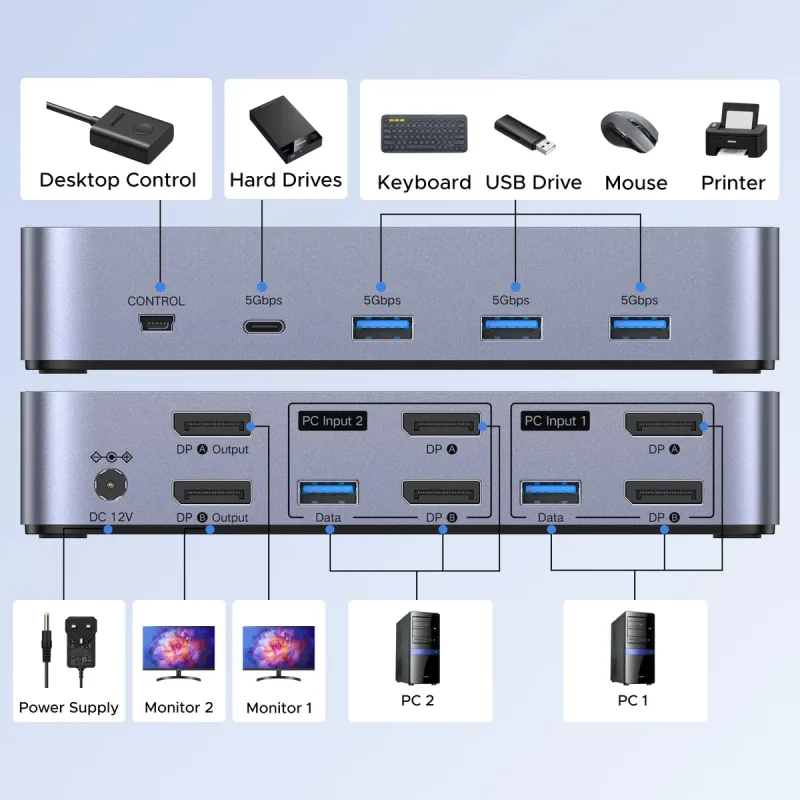
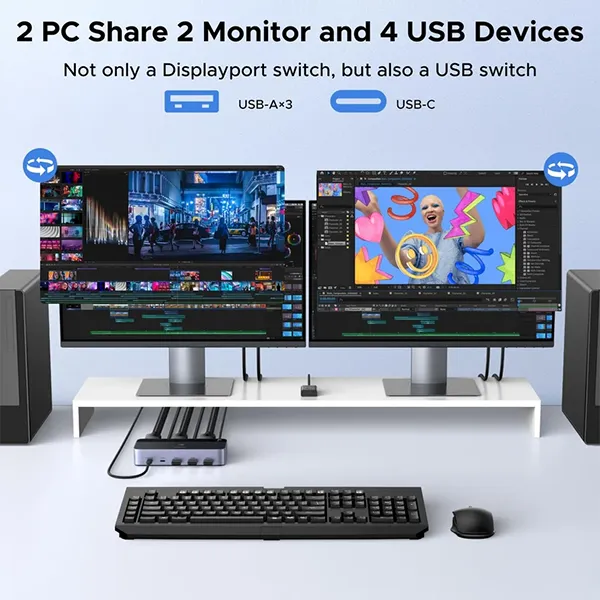
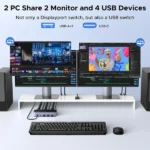
The UGREEN AK700 DisplayPort Dual Monitor KVM Switch 2 In 2 Out is designed for users who need to operate two computers through a shared dual-monitor workstation. By connecting two compatible computers and two DisplayPort monitors, you can switch between computers while sharing supported USB peripherals, including a keyboard, mouse, and other USB accessories.
This type of KVM switch is particularly useful for professionals who work with multiple computers, content creators, programmers, office workers, and users who want a more organised desk setup.
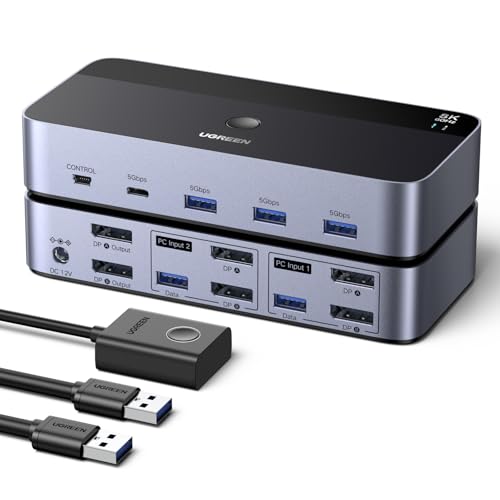
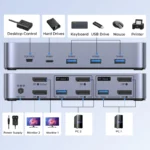
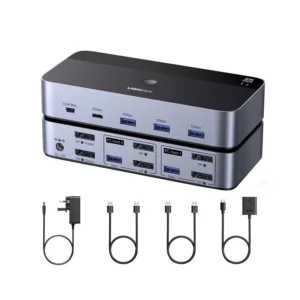
The model matching UGREEN’s official DisplayPort Dual Monitor KVM Switch, SKU 55851, supports DisplayPort 1.4, resolutions up to 8K at 60Hz, and compatible 4K high-refresh-rate modes. It also includes four USB 3.0 peripheral ports—three USB-A ports and one USB-C port—for sharing supported accessories between the connected computers.
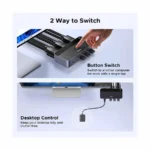
With a physical switching button and a wired desktop controller, users can change the active computer without repeatedly unplugging their monitors and peripherals. The switch supports Windows, macOS, and Linux, with basic plug-and-play operation that does not require dedicated switching software.
Available for customers shopping through AIYOZON, this UGREEN dual-monitor KVM switch is a useful solution for compatible workstations that require two displays, shared USB accessories, and convenient computer switching.
Important: The specifications below correspond to UGREEN’s official DisplayPort dual-monitor 2 In 2 Out model, SKU 55851. Confirm that the product being sold as AK700 is this exact model before publishing or ordering.
Key Features and Benefits
1. Dual Monitor Support for Two Computers
The UGREEN AK700-style dual-monitor KVM switch allows two compatible computers to share two DisplayPort monitors.
This setup is useful for people who need two screens for tasks such as coding, spreadsheets, research, video editing, or managing multiple applications.
Both monitors switch together to the selected computer. The switch does not independently display one computer on the first monitor and the other computer on the second monitor.
2. Ultra-High Resolution up to 8K at 60Hz
With DisplayPort 1.4 support, the corresponding UGREEN dual-monitor model supports video output up to 8K at 60Hz, with compatible 4K modes up to 240Hz listed by the manufacturer.
This provides flexibility for high-resolution monitors and supported high-refresh-rate displays. The actual resolution and refresh rate depend on the connected computers, graphics hardware, monitors, cables, and selected display configuration.
3. Four USB 3.0 Peripheral Ports
The switch includes four USB 3.0 downstream ports:
-
Three USB-A 3.0 ports
-
One USB-C 3.0 port
These ports allow compatible USB peripherals to be shared between the two computers. Supported devices may include keyboards, mice, USB storage devices, and other compatible accessories.
USB 3.0 offers data transfer rates of up to 5Gbps under suitable conditions. Actual performance varies depending on the computer, connected device, cable, and workload.
4. Convenient Switching Button and Desktop Controller
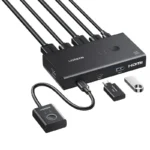
Switch between the two connected computers using the button on the KVM switch or its wired desktop controller.
The desktop controller can be placed in an accessible position, making it convenient to change computers without reaching behind your monitor or computer case.
The documented switching methods are the physical button and desktop controller; keyboard-hotkey switching is not supported on the corresponding model.
5. DisplayPort 1.4 Connectivity
DisplayPort 1.4 provides the video interface needed for supported high-resolution and high-refresh-rate display modes.
This makes the switch suitable for compatible DisplayPort-equipped desktops, graphics cards, and monitors. Users should check their devices’ available outputs before purchasing, especially when using laptops or docking stations.
6. Mirror and Extended Display Modes
Depending on the capabilities of the selected computer and its graphics hardware, the dual-monitor setup can be configured for mirroring or extending the desktop.
-
Mirror mode: Both monitors show the same content.
-
Extended mode: The monitors operate as separate areas of the selected computer’s desktop.
These modes are configured through the computer’s display settings. The KVM switch changes which computer controls both displays; it does not act as an independent video matrix.
7. Broad Operating System Compatibility
The corresponding UGREEN model supports Windows, macOS, and Linux. This helps users create a shared workstation across different computer environments.
Peripheral compatibility and available display features still depend on the operating system, drivers, graphics hardware, and connected devices.
8. A Cleaner and More Efficient Workspace
Using one KVM switch to share two monitors and USB accessories can reduce cable swapping and simplify a multi-computer desk.
It is particularly useful for home offices, business workstations, development environments, and users who regularly alternate between work and personal computers.
Why Choose the UGREEN AK700 DisplayPort KVM Switch?
A dual-monitor KVM switch is useful when you need two computers but do not want a separate monitor and set of peripherals for each system.
The UGREEN DisplayPort dual-monitor model combines two-display switching with USB peripheral sharing. Instead of manually changing monitor connections, you can switch the workstation to the computer you want to use.
Consider this product if you want to:
-
Connect two compatible computers to two DisplayPort monitors.
-
Switch both monitors between the connected computers.
-
Share a keyboard, mouse, and other compatible USB accessories.
-
Use supported high-resolution or high-refresh-rate displays.
-
Switch computers using a physical button or wired controller.
-
Reduce cable swapping and improve desk organisation.
-
Use a workstation that supports Windows, macOS, or Linux.
Before ordering, confirm that the product’s exact model and port configuration match your setup. In particular, each computer needs two suitable DisplayPort video outputs and a USB connection for peripheral switching when using the corresponding SKU 55851 configuration.
| Specification | Details |
|---|---|
| Brand | UGREEN |
| Product name | DisplayPort Dual Monitor KVM Switch |
| Model supplied in product title | AK700 |
| Matching official UGREEN SKU to verify | 55851 |
| Product type | 2 In 2 Out DisplayPort KVM Switch |
| Computer inputs | 2 computers |
| Monitor outputs | 2 DisplayPort monitors |
| Display interface | DisplayPort 1.4 |
| Maximum listed resolution | Up to 8K at 60Hz |
| Other supported modes | Compatible 4K high-refresh-rate modes, including up to 240Hz as listed by UGREEN |
| USB-A ports | 3 × USB 3.0 |
| USB-C ports | 1 × USB 3.0 |
| Maximum USB data rate | Up to 5Gbps |
| Switching methods | Physical button and wired desktop controller |
| Display modes | Mirror or extended mode, subject to host support |
| Operating systems | Windows, macOS, Linux |
| Driver installation | Not required for basic switching |
| Power supply | 12V/2A adapter for the matching SKU 55851 |
| DisplayPort cables | Not included in the listed package |
| USB host cables | 2 × USB-A cables listed |
| Hotkey switching | Not supported on the matching model |
Specifications are based on UGREEN’s official information for SKU 55851. The AK700 product title alone does not establish that every listing uses the same SKU, so verify the model number, included accessories, and power requirements with the seller.
Practical Uses
Home Office and Remote Work
Connect your work computer and personal computer to the same dual-monitor setup. Switch the complete workstation between computers when you need to move from work tasks to personal activities.
Programming and Software Development
Developers can use two monitors for code editors, documentation, terminals, debugging tools, and browser testing. Switching both screens to another computer can make it easier to work across separate development environments.
Graphic Design and Video Editing
Creative professionals can benefit from a dual-monitor workstation when managing timelines, editing tools, previews, and reference materials. Actual performance depends on the computer and graphics hardware.
Business and Office Productivity
Office workers can use two displays for spreadsheets, reports, communication tools, and business applications. Sharing the displays and USB peripherals can help simplify a multi-computer workspace.
IT Administration and Technical Work
IT professionals who manage two compatible computers can switch between systems without repeatedly reconnecting the same monitor and USB accessories.
Gaming and High-Refresh-Rate Displays
The matching DisplayPort 1.4 model lists support for compatible high-refresh-rate 4K modes. To use these modes, both computers and monitors must support the required resolution, refresh rate, and connection configuration.
How to Set Up the UGREEN AK700
-
Check your devices: Confirm that both computers have two suitable DisplayPort outputs and the required USB host connection.
-
Position the switch: Place the KVM switch on a stable surface near the computers and monitors.
-
Connect the first computer: Use two compatible DisplayPort cables for the video connections and the required USB host cable for peripheral switching.
-
Connect the second computer: Repeat the process for the second computer.
-
Connect both monitors: Connect each DisplayPort monitor to its corresponding output on the switch.
-
Connect USB accessories: Plug your compatible keyboard, mouse, and other USB peripherals into the switch’s USB ports.
-
Connect power: Use the correct power adapter specified for the exact model. The matching official SKU 55851 lists a 12V/2A adapter.
-
Select the computer: Use the switch’s physical button or wired desktop controller.
-
Configure your displays: Open your computer’s display settings and choose mirror or extended mode as required.
-
Check resolution and refresh rate: Select the desired supported display mode and confirm that both monitors operate correctly.
For 8K or high-refresh-rate output, use suitable DisplayPort cables and follow the manufacturer’s cable and connection recommendations. The final performance depends on the entire setup.
Compatibility and Important Notes
Before purchasing the UGREEN AK700 DisplayPort Dual Monitor KVM Switch, keep these points in mind:
-
Two DisplayPort monitors: This is a DisplayPort model, not an HDMI-only KVM switch.
-
Two video outputs per computer: The matching SKU 55851 requires two suitable DisplayPort connections from each computer.
-
Both monitors switch together: The selected computer controls both monitors.
-
Not an independent video matrix: It cannot show Computer 1 on one monitor and Computer 2 on the other simultaneously.
-
USB host connection required: Connect the required USB cable from each computer to enable shared USB peripherals.
-
DisplayPort cables are listed as not included: Check the package contents and purchase suitable cables if needed.
-
USB-C is a peripheral port: Do not assume the downstream USB-C port provides laptop charging or video input.
-
No keyboard hotkeys: Use the physical switch button or wired desktop controller.
-
High refresh rates require compatible hardware: The computers, graphics cards, cables, and monitors must all support the selected mode.
-
Laptop compatibility: A laptop may need a compatible docking station or adapter that provides two independent DisplayPort outputs. Confirm that the laptop supports two external displays.
These checks can help you avoid connection problems and ensure that the KVM switch meets your requirements.
UGREEN AK700 vs. a Standard DisplayPort Switch
| Feature | UGREEN AK700 Dual-Monitor KVM | Standard DisplayPort Switch |
|---|---|---|
| Main purpose | Switches two monitors and shares USB peripherals | Primarily switches video signals |
| Computer connections | 2 | Depends on the model |
| Monitor connections | 2 | Depends on the model |
| USB peripheral sharing | Yes | Usually not |
| DisplayPort 1.4 | Supported on the matching model | Depends on the model |
| Maximum listed resolution | Up to 8K at 60Hz | Depends on the model |
| Switching controls | Button and wired controller | Usually a button or remote |
| Best for | Dual-monitor, multi-computer workstations | Users who only need video-source switching |
Which should you choose? A standard DisplayPort switch may be sufficient if you only need to change video sources. The UGREEN dual-monitor KVM is more suitable if you want to switch two monitors and share USB peripherals between two computers.
Care and Safety Tips
-
Place the switch in a dry, well-ventilated location.
-
Use compatible DisplayPort and USB cables.
-
Avoid pulling cables by their connectors.
-
Use only the power supply specified for the exact model.
-
Keep liquids away from the switch and connected equipment.
-
Avoid bending DisplayPort cables sharply.
-
If a monitor displays no signal, check the selected computer, cable connections, power supply, and display settings.
-
If a high refresh rate is unavailable, check the graphics output, cable capability, monitor settings, and resolution configuration.
Why Buy from AIYOZON?
AIYOZON helps customers find useful accessories for computers, monitors, and everyday technology setups.
The UGREEN AK700-style dual-monitor KVM switch is worth considering if you want to share two displays and compatible USB accessories between two computers without repeatedly changing cables.
Before ordering through AIYOZON, confirm the exact model, package contents, compatibility with your computers, current price, warranty terms, and delivery details.
Frequently Asked Questions
1. What is the UGREEN AK700 DisplayPort Dual Monitor KVM Switch?
It is a dual-monitor KVM switch designed to connect two compatible computers to two DisplayPort monitors and share compatible USB peripherals between the computers.
2. Does the UGREEN dual-monitor KVM support 8K at 60Hz?
The matching official UGREEN DisplayPort dual-monitor model, SKU 55851, lists support for up to 8K at 60Hz. Actual performance depends on the computers, graphics hardware, cables, and monitors.
3. Can I connect two computers and two monitors?
Yes. The matching model is designed for two computers and two DisplayPort monitors, with both monitors switching together to the selected computer.
4. Can I show a different computer on each monitor?
No. Both monitors follow the selected computer. The switch does not independently route one computer to each monitor at the same time.
5. How many USB ports does it have?
The matching model provides four USB 3.0 peripheral ports: three USB-A ports and one USB-C port. These allow supported USB devices to be shared between the connected computers.
6. Does it support Windows, macOS, and Linux?
Yes. UGREEN lists Windows, macOS, and Linux compatibility for the corresponding model. Individual display and peripheral features depend on the connected hardware and operating system.
7. Are DisplayPort cables included?
UGREEN’s official listing for SKU 55851 says DisplayPort cables are not included. Check the seller’s package details to confirm exactly what comes with the product.
8. How long does delivery take from AIYOZON?
Typical estimated delivery times are:
-
Inside Dhaka: 24–48 Hours
-
Outside Dhaka: 2–3 Business Days
Delivery times may vary depending on the delivery location, stock availability, courier service, and the seller’s current shipping policy.
Final Recommendation
The UGREEN AK700 DisplayPort Dual Monitor KVM Switch 2 In 2 Out is designed for users who want to switch two DisplayPort monitors and share USB peripherals between two compatible computers. The corresponding UGREEN SKU 55851 offers DisplayPort 1.4 connectivity, up to 8K at 60Hz, four USB 3.0 peripheral ports, and convenient switching controls.
It can be a useful addition to professional workstations, home offices, programming setups, and compatible high-resolution display environments.
Before purchasing, verify that the product listed as AK700 matches the official SKU and that your computers have the required dual DisplayPort outputs.









Reviews
There are no reviews yet.