





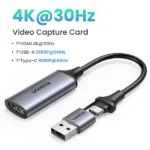


UGREEN CM716 HD USB Video Capture Card – 4K Input, 1080P 60Hz Streaming & Recording
Original price was: 2,400.00৳ .1,850.00৳ Current price is: 1,850.00৳ .
UGREEN CM716 HD USB Video Capture Card – 4K Input, 1080P 60Hz Streaming & Recording
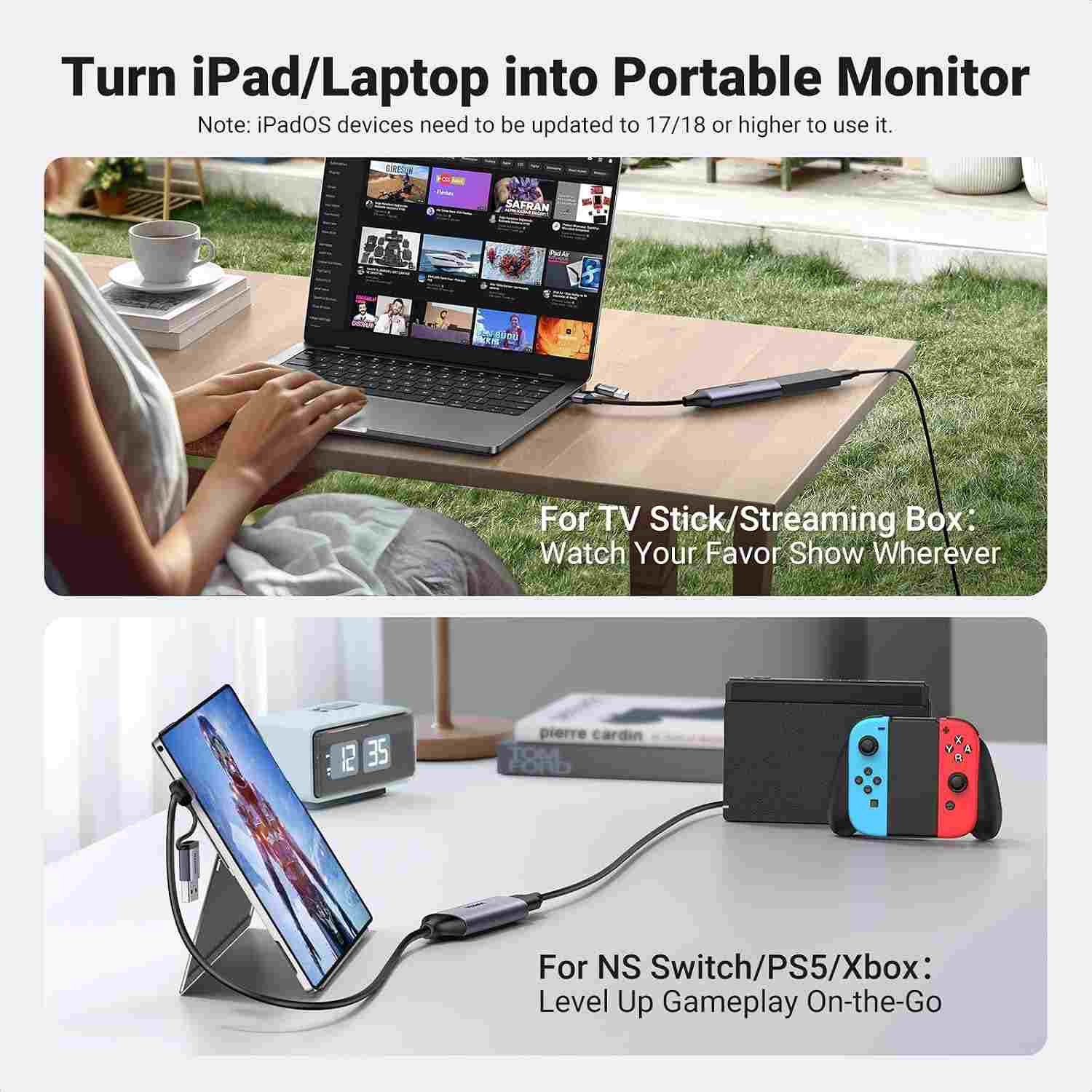
The UGREEN CM716 HD USB Video Capture Card is a compact video capture solution designed for gamers, streamers, content creators, educators and professionals who want to record or stream video from an HDMI-enabled device to a compatible computer, laptop, tablet or supported smartphone.
With support for HDMI input up to 4K@30Hz and video capture up to 1080p@60Hz, the CM716 helps you capture gameplay, camera footage, presentations and other HDMI video sources for recording, live streaming and online content creation. Its integrated USB-A and USB-C connectors make it convenient to connect to compatible devices without needing a separate USB adapter in many setups.
The capture card also supports embedded HDMI audio, allowing compatible recording and streaming software to receive video and sound through the same connection. Its compact design makes it practical for desktop setups and portable recording workflows.
Common Problems with Video Recording
Capturing video from a gaming console, camera or another HDMI source can be challenging without suitable equipment.
Common problems include:
- Difficulty recording console gameplay on a computer
- Limited options for streaming from an external camera
- Complicated capture-device installation
- Incompatible USB connectors
- Video and audio being handled through separate connections
- Bulky equipment that is inconvenient to carry
- Uncertainty about supported input and recording resolutions
The UGREEN CM716 offers a compact capture interface that helps simplify HDMI-to-USB video capture for compatible devices.
Smart Solution: HDMI to USB Video Capture
The UGREEN CM716 Capture Card connects an HDMI video source to a compatible host device through USB-A or USB-C.
HDMI Video Source → UGREEN CM716 → USB-A / USB-C Host → Recording or Streaming Software
Compatible source devices may include gaming consoles, cameras, camcorders and other HDMI-output equipment. On the receiving side, you can use compatible capture software such as OBS Studio, XSplit, PotPlayer or QuickTime Player, depending on your operating system.
Key Features
1. HDMI Input up to 4K@30Hz
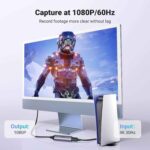
The CM716 accepts HDMI video input up to 4K@30Hz according to UGREEN’s product information. This allows you to connect compatible high-resolution sources while using the card’s supported capture output.
Important: 4K input does not mean 4K recording. The documented capture output is up to 1080p@60Hz.
2. Full HD Capture up to 1080p@60Hz
Capture video at up to 1920 × 1080 resolution and 60 frames per second for smooth gameplay footage, presentations, tutorials and live streams. This resolution and frame rate are well suited to many everyday content-creation workflows.
3. Integrated USB-A and USB-C Connectors
The integrated dual-connector design provides USB-A and USB-C connectivity, helping you connect to compatible laptops, desktop computers and other supported host devices.
This design can reduce the need to carry an additional USB adapter, although compatibility still depends on the device’s ports and software support.
4. HDMI Audio Capture
The CM716 supports audio embedded in the HDMI signal, with audio sampling specified up to 24-bit/48kHz. This allows compatible software to receive sound alongside the video signal.
5. Plug-and-Play Operation
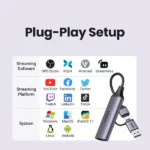
The device is designed for straightforward setup with compatible systems and capture applications. Supported software listed by retailers includes OBS Studio, XSplit, PotPlayer, QuickTime Player, Streamlabs and VLC, although availability varies by operating system.
6. Compact and Lightweight Design
The CM716 is a small capture adapter that can fit easily into a laptop bag or recording accessory case.
Some Bangladesh retailers list dimensions of approximately 80 × 30 × 11mm and a weight of around 35g. Exact measurements may vary slightly between listings.
7. Low-Latency Video Transmission
The capture card is designed for responsive video capture during streaming and recording. Actual latency depends on the source device, USB connection, computer performance, capture software and selected settings.
8. Compatible with Popular Capture Software
The CM716 is listed as compatible with software including:
- OBS Studio
- XSplit
- PotPlayer
- QuickTime Player
- Streamlabs
- VLC
Check the software’s capture-device support and your operating system’s requirements before connecting.
9. Multiple HDMI Source Applications
Depending on the output capabilities of your source device, you can use the CM716 with compatible:
- Gaming consoles
- DSLR and mirrorless cameras with HDMI output
- Camcorders
- Computers with HDMI output
- HDMI media devices
- Other supported HDMI video sources
The device captures an HDMI signal; it does not independently generate video from a source that lacks HDMI output.
Benefits of UGREEN CM716
- HDMI input up to 4K@30Hz
- Video capture up to 1080p@60Hz
- Integrated USB-A and USB-C connectors
- Embedded HDMI audio capture
- Compatible with popular recording software
- Compact, lightweight design
- Convenient for gaming and live streaming
- Useful for online teaching and presentations
- Suitable for compatible cameras and camcorders
- Straightforward USB connection
Perfect For
Gaming and Gameplay Recording
Capture compatible console gameplay on a computer for recording, commentary or streaming. Supported consoles may require settings adjustments before capture.
Live Streaming
Use the CM716 to bring a compatible HDMI video source into your streaming software.
Camera and DSLR Capture
Connect a camera with HDMI output to a supported computer and use compatible capture software for video production or live presentations.
Online Classes and Tutorials
Capture presentations, demonstrations and other HDMI video sources for educational content.
Content Creation
Record compatible external video sources for tutorials, reviews, demonstrations and other digital content.
Business Presentations
Use a compatible HDMI source with recording software for training videos, presentations and demonstrations.
Why Choose UGREEN CM716?
The UGREEN CM716 combines a compact form factor, integrated USB-A/USB-C connectivity and Full HD capture in one practical device.
Its main advantage is convenience: you can connect a compatible HDMI source to your computer and use supported software for recording or streaming without investing in a larger capture system.
It is particularly suitable for users who need 1080p@60Hz capture rather than professional 4K recording.
UGREEN CM716 vs. a Basic USB Webcam
| Feature | UGREEN CM716 Capture Card | Basic USB Webcam |
|---|---|---|
| Main Purpose | Captures video from an HDMI source | Captures video through its built-in camera |
| HDMI Input | Yes | Usually no |
| Maximum Listed Input | Up to 4K@30Hz | Not applicable |
| Maximum Listed Capture | Up to 1080p@60Hz | Varies by webcam |
| External Camera Support | Yes, with compatible HDMI output | Not usually required |
| Console Gameplay Capture | Yes, where compatible | No direct HDMI capture |
| USB-A / USB-C Connection | Integrated connectors | Depends on model |
| HDMI Audio Capture | Supported | Depends on webcam |
| Portable Design | Yes | Varies |
How to Use UGREEN CM716
Step 1: Prepare Your HDMI Source
Choose a compatible HDMI-output device, such as a camera, console or other supported video source.
Step 2: Connect the HDMI Cable
Connect the source device’s HDMI output to the CM716’s HDMI input. Use an appropriate HDMI cable; the cable is not listed as part of the standard package.
Step 3: Connect to Your Host Device
Plug the integrated USB-A or USB-C connector into a compatible computer or other supported host device.
Step 4: Open Capture Software
Launch compatible software such as OBS Studio, XSplit, PotPlayer or QuickTime Player, depending on your operating system.
Step 5: Select the Capture Device
Choose the UGREEN capture device as the video source. Configure the audio input if you want to record sound from HDMI.
Step 6: Set the Recording Resolution
Choose a supported capture setting, up to 1080p@60Hz. The exact options available depend on the source signal, host device and software.
Step 7: Test Before Streaming
Record a short clip and confirm that both video and audio are working correctly before beginning a live stream.
Use Cases
Console Gameplay
Capture supported gameplay footage for recording or streaming. For PlayStation consoles, HDCP-protected content cannot be captured by this device; supported gameplay capture may require HDCP to be disabled in the console settings.
DSLR and Camera Streaming
Use a compatible camera’s HDMI output as a source in your recording or streaming software.
Online Training
Record software demonstrations, presentations or external video feeds for lessons and tutorials.
Product Demonstrations
Capture an HDMI source for product demos, reviews and instructional videos.
Live Events
Use the card in a compatible laptop-based workflow for simple live video capture.
Cleaning & Maintenance
To help keep the capture card in good condition:
- Disconnect it before cleaning.
- Wipe the exterior with a dry, soft cloth.
- Keep the HDMI and USB connectors free from dust.
- Avoid exposing the device to moisture.
- Do not pull the device by its connector or cable.
- Store it in a dry place when not in use.
- Avoid bending or putting pressure on the connectors.
Important Usage Tips
- Confirm that the HDMI source provides a compatible video signal.
- Remember that 4K@30Hz is the listed input capability; capture is up to 1080p@60Hz.
- Use a suitable USB port on the host device.
- Ensure your recording software supports the capture device.
- Smartphone compatibility depends on the phone’s USB and video/capture support.
- Use an appropriate HDMI cable for your source device.
- HDCP-protected video cannot be captured; protected streaming services and some console output may not work.
Product Specifications
| Specification | Details |
|---|---|
| Brand | UGREEN |
| Product Name | HD USB Video Capture Card |
| Model | CM716 |
| Product Number | 25854 |
| Product Type | HDMI-to-USB Video Capture Card |
| HDMI Input | Up to 4K@30Hz |
| Maximum Capture Resolution | Up to 1080p@60Hz |
| USB Connectors | USB-A and USB-C |
| Video Format | MJPEG listed in the manual |
| Audio Capture | Embedded HDMI audio |
| Audio Sampling | Up to 24-bit/48kHz |
| Data Transfer Rate | Up to 480Mbps, according to retailer specifications |
| Supported Software | OBS Studio, XSplit, PotPlayer, QuickTime Player and others |
| Supported Systems | Windows 8.1/10/11, macOS, Linux and compatible Android devices |
| Material | Aluminum alloy + ABS, according to retailer listings |
| Color | Black / grey, depending on listing |
| Approx. Dimensions | 80 × 30 × 11mm |
| Approx. Weight | 35g |
| HDCP Capture | Not supported |
Specifications are based on the CM716/25854 manual and current retailer listings. Dimensions, host compatibility and input-resolution descriptions vary slightly by source, so verify the supplied unit’s documentation.
What’s in the Box?
The CM716 manual lists the following standard package contents:
- 1 × UGREEN CM716 HD USB Video Capture Card
- 1 × User Manual
Note: An HDMI cable, phone adapter or external power adapter is not listed in the standard package contents. Confirm the seller’s bundle before ordering.
Who Should Buy This Product?
The UGREEN CM716 is suitable for people who:
- Want to capture HDMI video on a computer
- Record compatible gaming-console footage
- Stream from a camera with HDMI output
- Create tutorials or educational videos
- Need an easy-to-carry capture card
- Prefer integrated USB-A and USB-C connectors
- Want Full HD capture at up to 60fps
If you require native 4K recording, HDR capture or advanced professional production features, check a higher-tier capture card’s specifications before buying.
Why Buy from AIYOZON?
When purchasing the UGREEN CM716 HD USB Video Capture Card from AIYOZON, you can enjoy a convenient shopping experience for practical technology accessories.
- Clear product specifications
- Convenient online ordering
- Product guidance before purchase
- Customer support
- Delivery options across Bangladesh
Always confirm the product model, warranty and included accessories before placing your order.
Frequently Asked Questions
What is the model number of this UGREEN capture card?
The model is CM716, with product number 25854.
Does the UGREEN CM716 support 4K?
It accepts HDMI input up to 4K@30Hz, but its listed maximum capture resolution is 1080p@60Hz. It should not be described as a native 4K recording card.
Can I use the CM716 for gaming streams?
Yes, it can capture compatible HDMI gameplay for recording and streaming. HDCP-protected signals cannot be captured, so some console settings may need to be changed for gameplay capture.
Does it capture audio?
Yes. It supports embedded HDMI audio, with sampling listed up to 24-bit/48kHz.
Does it work with OBS Studio?
Yes. OBS Studio is listed among the supported capture applications. Setup and available features depend on your operating system and OBS configuration.
Does it have USB-A and USB-C?
Yes. The CM716 uses an integrated dual USB-A/USB-C connector design, making it convenient for compatible host devices.
Can I connect a DSLR camera?
Yes, provided the camera has a compatible HDMI output and the host device supports the capture workflow. You may need to configure the camera’s HDMI output settings.
Can I use it with a smartphone?
It may work with compatible smartphones or tablets, but support depends on the device’s USB interface, operating system and capture application. Some phones may require a suitable adapter or app.
Does it support HDCP-protected content?
No. The CM716 manual states that HDCP-protected video cannot be captured.
Is an HDMI cable included?
The standard package contents list the capture card and user manual. An HDMI cable is not listed, so check the seller’s package details before ordering.
Final Verdict
The UGREEN CM716 HD USB Video Capture Card is a practical option for users who want to capture video from compatible HDMI sources without carrying bulky equipment.
With 4K@30Hz HDMI input, up to 1080p@60Hz capture, integrated USB-A and USB-C connectors, embedded HDMI audio and support for popular streaming software, it suits gamers, content creators, educators and camera users who need a compact Full HD capture solution.
Capture, Record and Stream with Ease
- ✔ HDMI input up to 4K@30Hz
- ✔ Full HD capture up to 1080p@60Hz
- ✔ Integrated USB-A and USB-C
- ✔ Embedded HDMI audio
- ✔ Compatible with OBS Studio and other capture software
- ✔ Compact, lightweight design
- ✔ Useful for gaming, cameras, tutorials and streaming









Reviews
There are no reviews yet.