



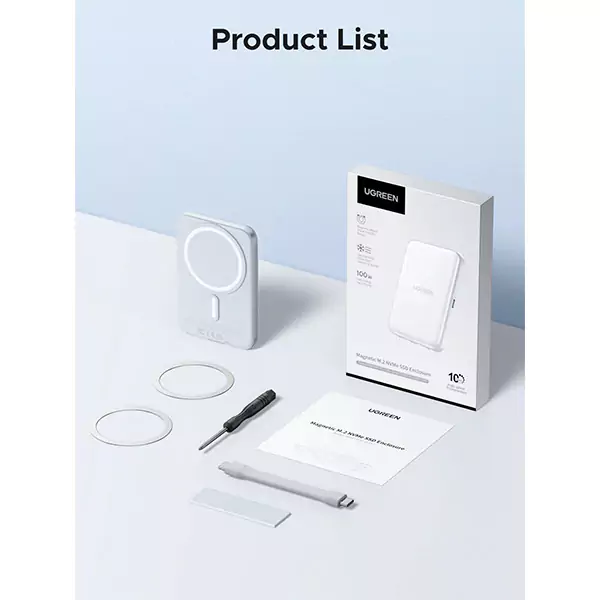
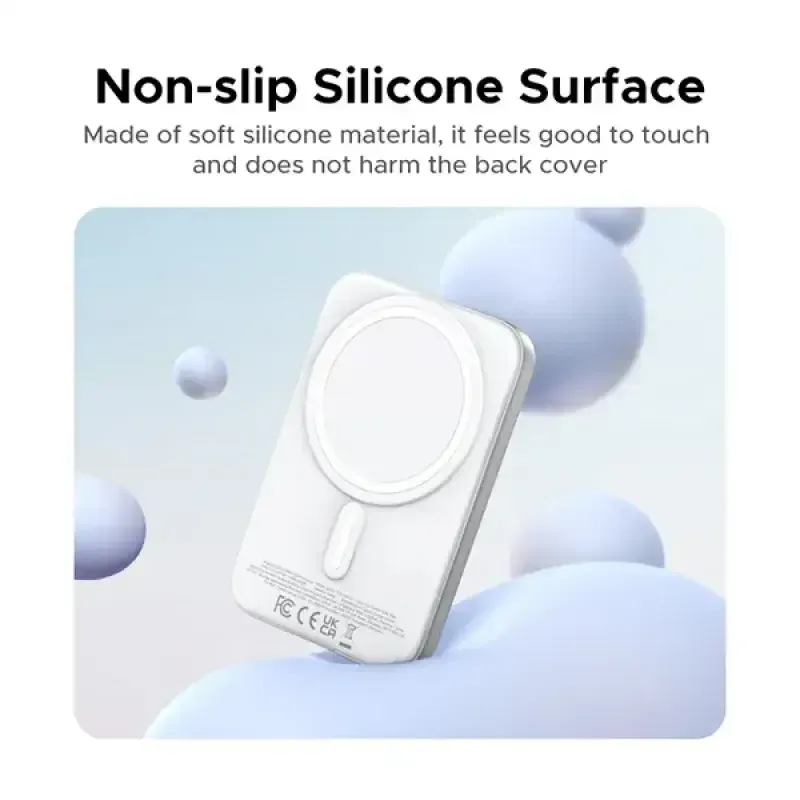





UGREEN D619 Magnetic M.2 NVMe SSD Enclosure 10Gbps with PD 100W (55151)
3,480.00৳
UGREEN D619 Magnetic M.2 NVMe SSD Enclosure 10Gbps with PD 100W
Premium Portable Storage for Modern Workflows
Managing large files can become frustrating when your laptop storage is limited or transferring videos and project folders takes too long. The UGREEN D619 Magnetic M.2 NVMe SSD Enclosure offers a practical solution by turning a compatible M.2 NVMe SSD into portable external storage. With USB-C 3.2 Gen 2 connectivity supporting data transfer speeds of up to 10Gbps, it is designed for users who regularly move large files between compatible devices.
Available through AIYOZON, this UGREEN SSD enclosure combines fast data connectivity, magnetic mounting, and up to 100W Power Delivery pass-through in one compact accessory. It supports compatible NVMe SSDs in four common sizes, making it useful for content creators, photographers, students, professionals, and technology enthusiasts. Whether you need to back up important documents, access a video library, or carry project files between your computer and mobile device, it provides a flexible external storage solution for everyday use in Bangladesh.
Common Problems with Ordinary External Storage
Traditional storage devices remain useful, but they may not offer the flexibility or connectivity needed for modern workflows. Users working with large video files, creative projects, or frequent backups often need a faster and more adaptable storage setup.
Common challenges include:
- 💾 Limited Internal Storage: Large applications, photos, videos, and work files can quickly fill a laptop or smartphone.
- 🐢 Slow File Transfers: Older storage devices and slower interfaces can increase waiting time when copying large folders.
- 🎥 Difficult Mobile Workflows: Recording and managing high-resolution video can require additional external storage.
- 🔌 Cable Clutter: Using multiple accessories can make a mobile workstation less convenient.
- 🔋 Charging Conflicts: Connecting an external drive may complicate charging arrangements on some setups.
- 🌡️ Heat Build-Up: Sustained file transfers can generate heat inside compact storage enclosures.
- 🧩 Compatibility Confusion: Not every M.2 SSD uses the same interface or protocol, making it easy to select an incompatible enclosure.
The UGREEN D619 addresses several of these challenges with a fast USB-C interface, a magnetic mounting design, thermal-management materials, and a dedicated USB-C power pass-through connection.
Smart Solution: UGREEN D619 Magnetic M.2 NVMe SSD Enclosure
The UGREEN D619 Magnetic M.2 NVMe SSD Enclosure 10Gbps with PD 100W is designed to convert a compatible M.2 NVMe SSD into portable external storage. Instead of purchasing a complete external SSD, you can install a supported NVMe drive in the enclosure and use it as an external storage device. This also gives you flexibility when choosing your SSD capacity, subject to the enclosure’s supported limits.
Its USB-C 3.2 Gen 2 host interface supports transfer speeds of up to 10Gbps. This bandwidth is useful for moving large files, backing up important data, and accessing media libraries. Actual read and write speeds depend on the installed SSD, host device, cable, file sizes, and other system limitations; 10Gbps is the interface’s maximum theoretical data rate, not a guaranteed sustained transfer speed.
The enclosure also features magnetic mounting for compatible devices and a separate USB-C port supporting up to 100W PD pass-through charging. This allows a compatible host device to receive power while the enclosure is connected, when used with a suitable charger and cable. Its compact design and passive thermal-management system make it a practical choice for mobile workflows, desk setups, and everyday data management.
Key Features of UGREEN D619 Magnetic M.2 NVMe SSD Enclosure
⚡ 1. High-Speed 10Gbps USB-C Connectivity
The USB-C 3.2 Gen 2 interface supports data transfer speeds of up to 10Gbps. This provides useful bandwidth for transferring large folders, backing up media, and accessing files stored on a compatible NVMe SSD.
For creators and professionals who regularly work with large files, a faster interface can help reduce waiting time compared with slower connections. Actual performance still depends on the SSD, host port, cable, and workload.
💾 2. Supports M.2 NVMe SSDs up to 8TB
The UGREEN D619 supports compatible M.2 NVMe SSDs with capacities of up to 8TB. This allows users to configure external storage according to their own needs, from everyday documents to extensive video and photo libraries.
The enclosure supports common M.2 drive lengths: 2230, 2242, 2260, and 2280. It is designed for NVMe/PCIe drives with supported key configurations; M.2 SATA SSDs are not supported.
🧲 3. Magnetic Mounting for Compatible Devices
The magnetic design helps attach the enclosure to compatible magnetic devices or cases. This can make a mobile storage setup more convenient by keeping the enclosure close to the device during supported workflows.
For devices without built-in magnetic compatibility, the appropriate included magnetic ring may be required. Magnetic attachment and data connectivity are separate requirements, so always check whether your device supports the necessary USB-C connection and storage functions.
🔋 4. Up to 100W PD Pass-Through Charging
A dedicated USB-C power connection supports up to 100W Power Delivery pass-through. This feature allows a compatible host device to receive power while connected to the enclosure, helping simplify charging during work.
The 100W rating refers to the maximum supported PD pass-through capability, not the enclosure’s data transfer speed. Actual charging power depends on the charger, cable, connected device, and power requirements of the overall setup.
🌡️ 5. Passive Cooling with Thermal Materials
The enclosure uses an alloy body and a silicon dioxide (SiO₂) aerogel thermal layer to help manage heat from the installed SSD. Passive cooling works without an additional cooling fan, so there is no fan noise during normal operation.
NVMe drives can become warm during sustained data transfers. Thermal performance depends on the installed SSD, workload, surrounding temperature, and ventilation, so adequate airflow remains important.
📱 6. Flexible Computer and Mobile Compatibility
The enclosure can be used with compatible Windows, macOS, Linux, iOS, and Android devices, provided the host supports the required USB-C storage connection and the appropriate external-drive functions.
This flexibility makes it useful for users who move between a laptop, desktop computer, tablet, or compatible smartphone. Some mobile recording features depend on the specific phone model, operating system, camera application, and video settings.
🧳 7. Compact, Portable Construction
With dimensions of approximately 101 × 69 × 11 mm, the enclosure is compact enough to carry in a laptop bag or everyday tech pouch. Its aluminium or magnesium-alloy construction gives it a solid enclosure for a portable SSD setup.
The enclosure is supplied without an installed SSD, so its final storage capacity and overall performance depend on the drive you choose.
🔌 8. Convenient External Storage Setup
Once a compatible NVMe SSD is installed, the enclosure connects to a host device through USB-C. This provides a convenient way to access files, transfer data, and maintain separate storage for work or personal projects.
Depending on the host device and operating system, you may need to format a new SSD before using it. Always back up existing files before formatting, as formatting can erase data.
Benefits You’ll Enjoy
- ✅ Faster File Transfers: Take advantage of up to 10Gbps USB-C connectivity.
- 💾 Flexible Storage Capacity: Choose a compatible M.2 NVMe SSD up to the supported 8TB limit.
- 🎥 Creator-Friendly Workflow: Keep project files and compatible video-recording storage close at hand.
- 🧲 Magnetic Convenience: Attach the enclosure to a compatible magnetic device or case.
- 🔋 Power Pass-Through: Support host-device charging through a compatible setup with up to 100W PD capability.
- 🌡️ Fanless Cooling: Benefit from passive thermal management without fan noise.
- 🎒 Portable Design: Carry external storage between home, office, school, or travel destinations.
- 🖥️ Versatile Connectivity: Use compatible computers and mobile devices that support external NVMe storage.
- 🔄 Reusable Storage Solution: Install a supported SSD to create an external drive tailored to your requirements.
- ⭐ Smart Storage Upgrade: Build a more flexible storage setup without relying solely on internal device capacity.
Perfect For
- 🎬 Videographers: Store and transfer large video projects between compatible devices.
- 📸 Photographers: Keep photo libraries and project backups in portable external storage.
- 💻 Laptop Users: Expand available storage with a compatible NVMe SSD.
- 🎓 Students: Carry assignments, research files, presentations, and project folders.
- 🧑💻 Freelancers: Manage client files and creative assets across compatible computers.
- 🎨 Designers: Store large design projects, reference files, and exported assets.
- 📱 Mobile Content Creators: Use supported external storage workflows on compatible smartphones.
- 🎮 Gaming Enthusiasts: Carry compatible game files or media libraries where the host system supports external storage.
- 🗂️ Business Professionals: Keep important documents and project backups organised.
- ✈️ Frequent Travellers: Carry a compact storage solution for work and personal media.
Why Choose the UGREEN D619 Magnetic M.2 NVMe SSD Enclosure?
High-Speed Storage Without Buying a Complete External SSD
The D619 lets you install a compatible NVMe SSD instead of relying on a fixed-capacity external drive. This is useful if you already own a suitable SSD or want to choose your own storage capacity. It also gives you the flexibility to replace or upgrade the installed drive later, subject to compatibility.
Designed for Mobile and Desktop Workflows
Magnetic mounting can help keep the enclosure attached to compatible devices during mobile use, while USB-C connectivity makes it suitable for supported computers and tablets. This combination is especially practical for users who move between different work environments.
Power and Data in One Practical Setup
The dedicated PD pass-through connection supports charging a compatible host device while the enclosure is connected. Rather than treating storage and power as entirely separate concerns, the D619 helps make them part of one organised workflow. Actual charging and data performance depend on the connected equipment.
Thoughtful Thermal Management
The alloy body and SiO₂ aerogel thermal layer are designed to help manage heat without requiring an active cooling fan. This is useful for users who want a quiet storage accessory for desks, editing spaces, or mobile workstations.
A Versatile Accessory for Everyday Data Management
Whether you manage documents, creative assets, or large media libraries, the D619 offers a flexible way to make a compatible NVMe SSD portable. It is important to remember that the enclosure does not include the SSD itself, and its performance depends partly on the drive installed.
UGREEN D619 vs Ordinary SSD Enclosures
| Feature | UGREEN D619 (55151) | Ordinary SSD Enclosures |
|---|---|---|
| Host interface | USB-C 3.2 Gen 2 | Varies by model |
| Maximum interface speed | Up to 10Gbps | Varies |
| SSD protocol | M.2 NVMe/PCIe only | NVMe, SATA, or both depending on model |
| Supported SSD sizes | 2230, 2242, 2260, 2280 | Varies |
| Maximum supported capacity | Up to 8TB | Varies by model |
| Magnetic mounting | Yes | Usually not included |
| PD pass-through | Up to 100W | Varies; often unavailable |
| Cooling | Passive alloy body with SiO₂ aerogel thermal layer | Varies |
| Installed SSD included | No; SSD sold separately | Varies |
| Best suited for | Users wanting magnetic mounting, NVMe storage, and PD pass-through | Depends on interface, capacity, and required features |
The D619 stands out for combining magnetic mounting, NVMe support, 10Gbps connectivity, and 100W PD pass-through. However, users with an M.2 SATA drive should choose an enclosure that explicitly supports SATA rather than assuming every M.2 enclosure is compatible.
How to Use the UGREEN D619 Magnetic M.2 NVMe SSD Enclosure
- Choose a compatible SSD: Select an M.2 NVMe/PCIe SSD in 2230, 2242, 2260, or 2280 size. Do not use an M.2 SATA drive.
- Open the enclosure: Follow the supplied instructions and use the included installation tool if provided.
- Install the SSD: Insert the drive into the correct connector and secure it according to the manufacturer’s instructions.
- Apply the thermal pad: Position the supplied thermal material as directed so it can help transfer heat from the SSD to the enclosure.
- Close the enclosure: Secure the cover and confirm the drive is installed correctly before connecting it to a device.
- Connect through USB-C: Attach the enclosure to a compatible computer or mobile device using a suitable cable. If the SSD is new, format it only after confirming it contains no data you need.
- Use PD pass-through if required: Connect a compatible charger to the dedicated power input and verify that the host device supports the intended charging setup.
Important Usage Tips
Use only a compatible M.2 NVMe/PCIe SSD. M.2 describes the physical form factor, not necessarily the storage protocol; an M.2 SATA drive will not work in an NVMe-only enclosure.
The advertised 10Gbps is the maximum interface rate, not a guaranteed real-world transfer speed. Actual performance depends on the SSD, host USB-C port, cable, file type, and other hardware limitations. For best results, connect it to a compatible USB 3.2 Gen 2 port.
The 100W PD rating refers to pass-through charging capability. Use a compatible USB-C PD charger and cable, and confirm that the connected device accepts the required charging profile. The enclosure cannot make a device charge at 100W if that device does not support it.
Keep the enclosure dry and avoid exposing it to excessive heat, impacts, or pressure. This model is not water-resistant. During long transfers, allow enough ventilation for passive cooling and safely eject the drive before disconnecting it when the operating system recommends doing so.
If the SSD contains important files, keep a separate backup. External storage is useful for data management but should not be treated as the only copy of irreplaceable information.
Product Specifications
| Specification | Details |
|---|---|
| Brand | UGREEN |
| Model | D619 |
| Part Number / SKU | 55151 |
| Product Type | Magnetic M.2 NVMe SSD Enclosure |
| Host Interface | USB-C 3.2 Gen 2 |
| Maximum Data Transfer Rate | Up to 10Gbps |
| Supported SSD Protocol | NVMe / PCIe |
| Supported SSD Key Types | M-Key and compatible B+M Key NVMe drives |
| Supported SSD Sizes | 2230, 2242, 2260, 2280 |
| Maximum Supported Capacity | Up to 8TB |
| PD Pass-Through | Up to 100W |
| Magnetic Mounting | Yes, for compatible devices or magnetic rings |
| Cooling System | Passive cooling |
| Thermal Material | SiO₂ aerogel thermal layer |
| Body Material | Aluminium / magnesium alloy |
| Dimensions | Approximately 101 × 69 × 11 mm |
| Colour | Grey / silver; confirm the supplied variant |
| SSD Included | No; SSD sold separately |
| Water Resistance | Not water-resistant |
| Compatibility | Compatible Windows, macOS, Linux, iOS, and Android devices with required external storage support |
| Accessories | Please check the product packaging/product listing for the exact included accessories. |
Specifications are based on the manufacturer’s product information and available model listings. Compatibility and performance may vary depending on the SSD and host device.
Why Buy from AIYOZON?
AIYOZON offers a convenient online shopping experience for customers in Bangladesh looking for useful technology accessories and storage solutions. The UGREEN D619 is a practical option for users who want to build portable NVMe storage with magnetic mounting and power pass-through features.
Before ordering, make sure you have a compatible NVMe SSD or plan to purchase one separately. Checking the SSD protocol, physical size, and host-device compatibility will help you get the best experience from the enclosure.
- ✅ Quality Products
- 🚚 Fast Delivery Across Bangladesh
- 📦 Secure Packaging
- 💬 Responsive Customer Support
- ⭐ Convenient Online Shopping
- 💯 Great Value for Money
Frequently Asked Questions
1. What does the UGREEN D619 Magnetic M.2 NVMe SSD Enclosure do?
It converts a compatible M.2 NVMe SSD into portable external storage that connects through USB-C. You can use it to store, transfer, and access files on compatible computers and mobile devices. The SSD itself is not included.
2. Does the UGREEN D619 support M.2 SATA SSDs?
No. The D619 is designed for NVMe/PCIe SSDs. An M.2 SATA drive is not compatible even if its physical size appears to fit, so check the drive’s interface before purchase.
3. What is the maximum data transfer speed?
The enclosure supports USB-C 3.2 Gen 2 with a maximum interface speed of 10Gbps. Real-world speeds depend on the installed SSD, host port, cable, and file-transfer conditions.
4. Can it support an SSD up to 8TB?
Yes, the model is listed as supporting compatible NVMe SSDs up to 8TB. Make sure the drive uses a supported NVMe/PCIe protocol and one of the supported physical sizes.
5. What does 100W PD pass-through mean?
It means the enclosure supports up to 100W Power Delivery pass-through charging through its dedicated USB-C power connection. This can allow a compatible laptop or other host device to receive power while the SSD enclosure is connected. Actual charging power depends on the charger, cable, and host device.
6. Can I attach it to my smartphone?
The magnetic mounting system is designed for compatible magnetic phones and cases. The device must also support the necessary USB-C data connection and external storage functions. Some Android phones may require a compatible magnetic case or the included magnetic ring.
7. Does the enclosure include an SSD?
No. The UGREEN D619 is an enclosure, so you need to install a compatible M.2 NVMe SSD separately. Check the package contents for the exact cables and installation accessories included with your purchase.
8. How long does delivery take from AIYOZON?
Estimated delivery is 24–48 hours inside Dhaka and 2–3 business days outside Dhaka. Actual delivery times may vary depending on your location and operational conditions.
Upgrade Your Storage Workflow with UGREEN D619
Make your compatible NVMe SSD more versatile with the UGREEN D619 Magnetic M.2 NVMe SSD Enclosure 10Gbps with PD 100W (55151). With fast USB-C connectivity, magnetic mounting, support for SSDs up to 8TB, and PD pass-through charging, it offers a practical solution for managing large files across compatible devices.
Whether you are a content creator, student, professional, or technology enthusiast, this enclosure helps you build a portable storage setup tailored to your needs. Just remember to select a compatible NVMe SSD and confirm your host device’s connectivity before ordering.
Order the UGREEN D619 Magnetic M.2 NVMe SSD Enclosure from AIYOZON today and enjoy a more flexible approach to portable storage in Bangladesh.



Reviews
There are no reviews yet.