




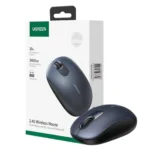


UGREEN MU105 2.4G Wireless Mouse 2400 DPI – Silent Ergonomic Wireless Mouse
1,190.00৳
UGREEN MU105 2.4G Wireless Mouse 2400 DPI – Silent Ergonomic Wireless Mouse
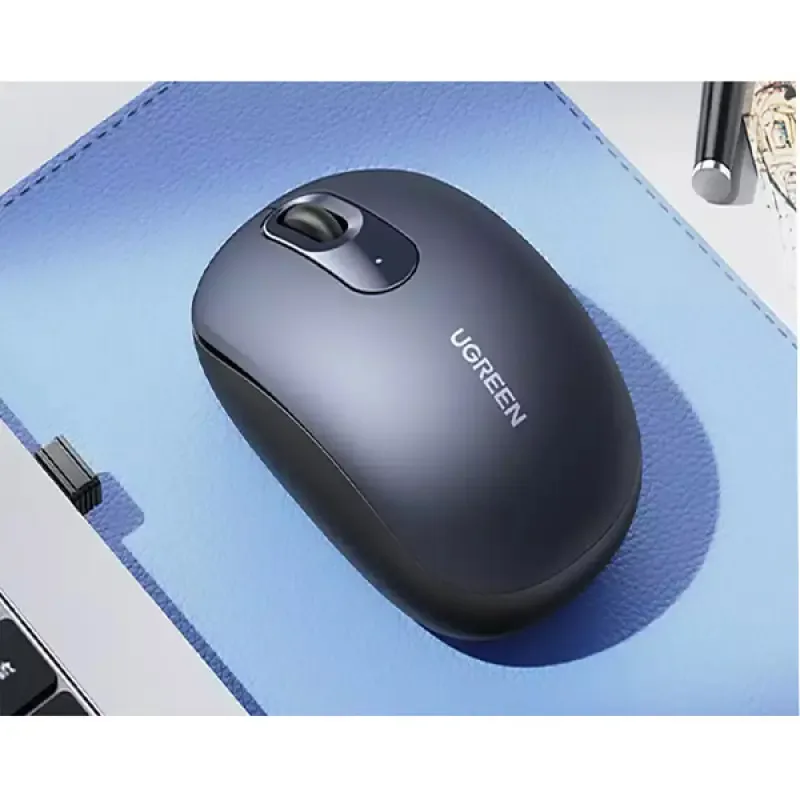
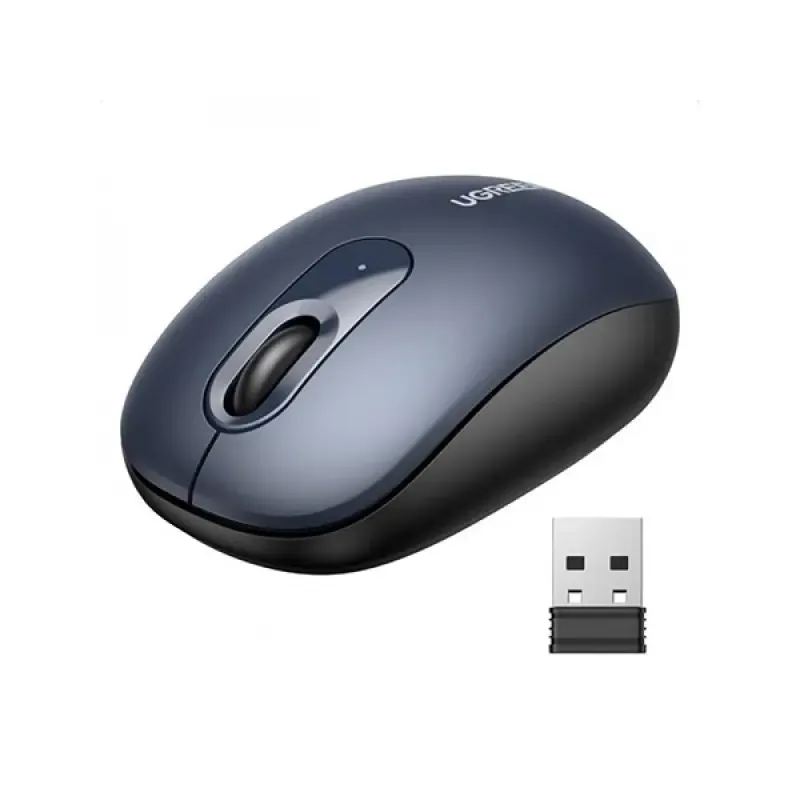
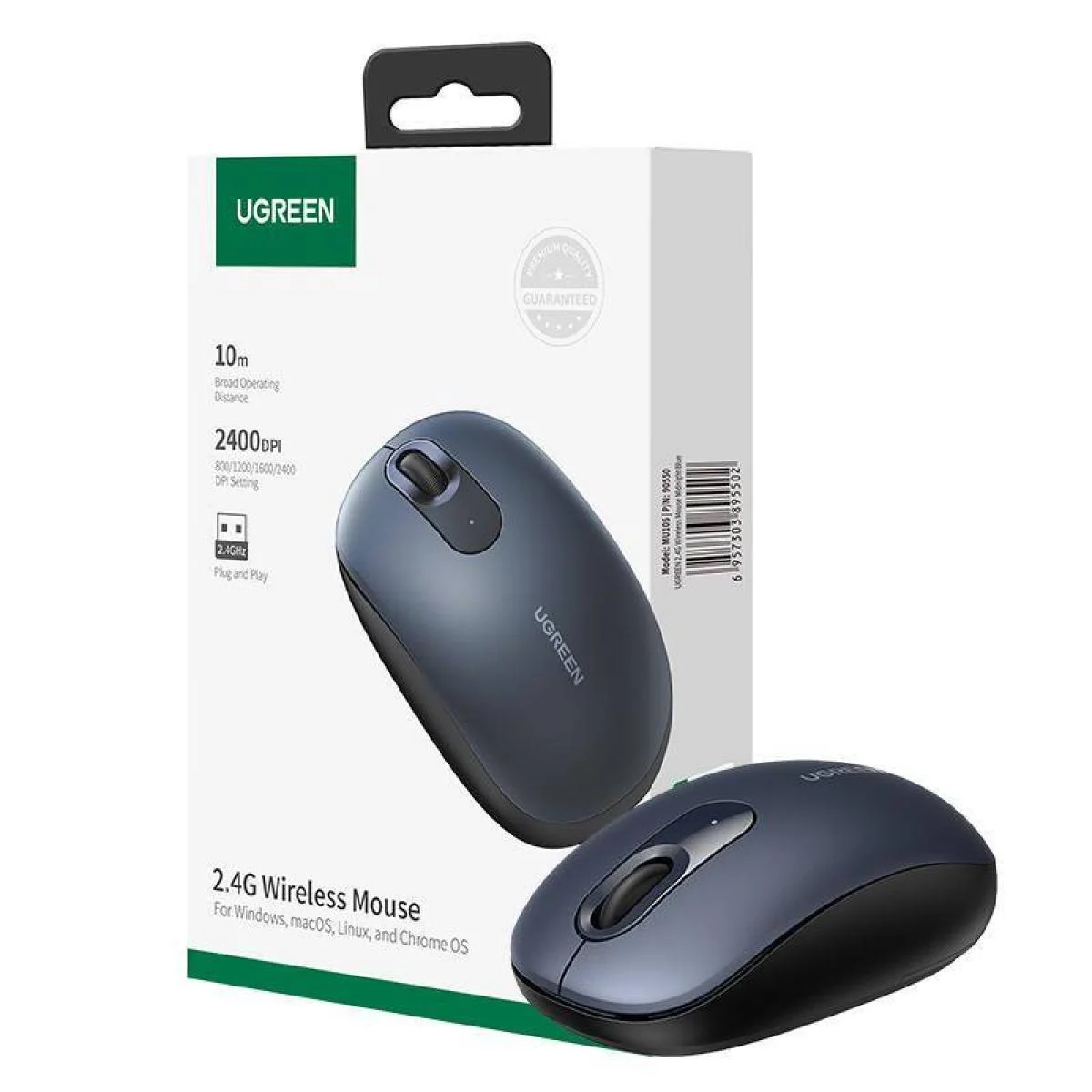
The UGREEN MU105 2.4G Wireless Mouse 2400 DPI is a compact and comfortable wireless mouse designed for everyday work, study, browsing and general computer use. It uses a reliable 2.4GHz wireless connection with a USB receiver and provides a wireless operating distance of up to 10 meters under suitable conditions.
The MU105 offers four adjustable DPI levels — 800, 1200, 1600 and 2400 DPI — allowing you to adjust cursor sensitivity according to your task. Its ergonomic shape and quiet-click design make it particularly suitable for offices, libraries, study areas and late-night computer use.
Powered by one AA battery, the mouse is designed for convenient cordless use without requiring regular charging. Bangladesh retailers list battery life of up to approximately 18 months, depending on usage conditions.
Common Problems with Ordinary Wireless Mice
A low-quality mouse can make everyday computer use frustrating.
Common issues include:
- Unstable wireless connections
- Excessive clicking noise
- Limited cursor sensitivity
- Uncomfortable grip
- Frequent battery replacement
- Short operating range
- Complicated setup
- Poor tracking on different surfaces
The UGREEN MU105 addresses these everyday requirements with 2.4GHz wireless connectivity, adjustable DPI, silent operation and an ergonomic design.
Smart Solution for Everyday Computer Use
The UGREEN MU105 Wireless Mouse combines simple plug-and-play connectivity with adjustable sensitivity and quiet operation.
Simply insert the USB receiver into a compatible device, install the AA battery and switch on the mouse. The wireless connection allows you to operate the computer without a cable across your desk.
Key Features
1. 2.4GHz Wireless Connection
The MU105 uses 2.4GHz wireless technology to provide a stable connection between the mouse and USB receiver.
It offers an operating distance of up to 10 meters / 33 feet when there are no significant obstructions.
2. Up to 2400 DPI Sensitivity
The mouse supports four sensitivity levels:
- 800 DPI
- 1200 DPI
- 1600 DPI
- 2400 DPI
The default sensitivity is 1200 DPI, and the DPI switch cycles through the available settings.
This allows you to choose lower sensitivity for controlled cursor movement or higher sensitivity for faster navigation.
3. Silent Click Design
The MU105 is designed with quiet/silent buttons, making it suitable for environments where clicking noise can be distracting.
Bangladesh retailer specifications describe the mouse as a silent model with noise-reduction design.
4. Ergonomic Shape
The streamlined body is designed to fit comfortably in the palm during everyday use.
Its rounded shape makes it suitable for extended office work, browsing, studying and general computer operation.
5. 3-Button Layout
The MU105 uses a simple 3-button configuration:
- Left click
- Right click
- Scroll wheel
This straightforward design is suitable for everyday productivity and general computer tasks.
6. Optical Tracking
The mouse uses an optical tracking system for cursor movement. Retailer specifications also list compatibility with different common surfaces, including paper, wood, fabric and some glass surfaces.
7. Long Battery Life
The mouse operates using one AA battery.
Some Bangladesh retailers list battery life of up to approximately 18 months, although actual battery life depends on usage, battery quality and operating conditions.
8. Plug & Play Setup
The MU105 is designed for simple wireless setup.
Insert the USB receiver into a compatible USB port, switch on the mouse and begin using it.
9. USB Receiver Storage
The wireless receiver can be stored inside the mouse when not in use on applicable configurations, helping reduce the chance of losing the small USB receiver.
10. Lightweight 85g Design
The MU105 weighs approximately 85g, making it light enough for comfortable everyday carrying and use.
Benefits
- 2.4GHz wireless connectivity
- Up to 10m operating distance
- Adjustable 800/1200/1600/2400 DPI
- Maximum 2400 DPI sensitivity
- Silent click design
- Ergonomic shape
- Optical tracking
- 3-button operation
- One AA battery
- Up to approximately 18-month battery life under listed conditions
- Plug-and-play setup
- Lightweight 85g body
- Suitable for work, study and browsing
- Multiple color options depending on variant
Perfect For
The UGREEN MU105 Wireless Mouse is ideal for:
- Office workers
- Students
- Home users
- Freelancers
- Digital marketers
- Graphic and web designers
- Laptop users
- Desktop PC users
- Remote workers
- Library and study environments
- Anyone who prefers quiet mouse clicks
Why Choose UGREEN MU105?
The MU105 focuses on the features most users need for everyday computer work rather than unnecessary complexity.
Its 2.4GHz wireless connection, adjustable DPI, silent clicks, ergonomic body and long battery life make it a practical choice for office productivity, browsing, studying and general computer use.
UGREEN MU105 vs Traditional Wired Mouse
| Feature | UGREEN MU105 | Traditional Wired Mouse |
|---|---|---|
| Connection | 2.4GHz Wireless | USB Cable |
| Maximum DPI | 2400 DPI | Varies |
| DPI Levels | 800 / 1200 / 1600 / 2400 | Varies |
| Operating Range | Up to 10m | Cable length |
| Cable Required | No | Yes |
| Silent Clicks | Yes | Depends on model |
| Battery | 1 × AA | No |
| Buttons | 3 | Varies |
| Tracking | Optical | Usually Optical |
| Portability | High | Moderate |
How to Use UGREEN MU105
Step 1: Insert the AA Battery
Open the battery compartment and insert one compatible AA battery according to the indicated polarity. The battery is included with many retail packages.
Step 2: Connect the USB Receiver
Remove the wireless receiver from its storage location and insert it into an available USB port on your computer.
Step 3: Turn On the Mouse
Switch on the mouse and move it across the surface.
Step 4: Adjust DPI if Needed
Use the DPI switch to cycle through 1200, 1600, 2400 and 800 DPI. The default setting is 1200 DPI.
Step 5: Start Using the Mouse
The mouse is designed for plug-and-play operation on compatible systems.
DPI Guide
800 DPI
Best for slower, more controlled cursor movement.
1200 DPI
A balanced setting suitable for general office work and browsing.
1600 DPI
Useful when you want faster cursor movement across the screen.
2400 DPI
The highest available setting, suitable for fast navigation and larger/high-resolution displays.
Use Cases
Office Work
Use the silent buttons and ergonomic shape for everyday documents, spreadsheets, email and web browsing.
Study
The quiet operation makes the MU105 useful for libraries, study rooms and shared environments.
Digital Marketing
The mouse is practical for SEO work, Google Ads, analytics dashboards, content management systems and other browser-based tasks.
Graphic & Web Design
Adjustable DPI can provide more control when navigating design software and detailed interfaces.
Home Computing
Its wireless design keeps your desk free from an additional mouse cable.
Laptop Use
The compact wireless design makes it a convenient companion for compatible laptops and notebooks.
Cleaning & Maintenance
To maintain the mouse:
- Keep the optical sensor area free from dust.
- Wipe the exterior with a soft, dry or slightly damp cloth.
- Do not pour liquid directly onto the mouse.
- Keep the mouse away from water.
- Clean the scroll wheel carefully if dust accumulates.
- Avoid dropping or striking the mouse.
- Replace the AA battery when the indicator shows low battery.
- Remove the battery if storing the mouse for an extended period to reduce the risk of leakage or corrosion.
Important Usage Tips
- Keep the USB receiver connected securely.
- Avoid placing the receiver behind objects that may significantly interfere with the wireless signal.
- Do not immerse the mouse in water.
- Do not dismantle the mouse except for battery replacement.
- Avoid exposing the mouse to extreme humidity or temperatures.
- Do not point the optical sensor directly toward people’s eyes.
- Remove the battery before long-term storage.
- Keep the USB receiver safely stored when transporting the mouse.
Product Specifications
| Specification | Details |
|---|---|
| Brand | UGREEN |
| Model | MU105 |
| Product Type | 2.4G Wireless Mouse |
| Connectivity | 2.4GHz Wireless |
| Receiver | USB Receiver / Dongle |
| Operating Distance | Up to 10m / 33ft |
| DPI | 800 / 1200 / 1600 / 2400 DPI |
| Maximum DPI | 2400 DPI |
| Tracking | Optical |
| Buttons | 3 |
| Click Type | Silent / Low-Noise |
| Scroll Wheel | Yes |
| Battery | 1 × AA |
| Battery Type | Non-Rechargeable |
| Battery Life | Up to approx. 18 months* |
| Operating Voltage | 1.5V |
| Operating Current | Approx. 10–12mA |
| Weight | Approx. 85g |
| Dimensions | Approx. 67 × 62 × 39mm** |
| Operating Temperature | -5°C to 40°C |
| Storage Temperature | -10°C to 60°C |
| OS Compatibility | Windows, macOS, Linux, Chrome OS and Android* |
| Wireless Frequency | 2.4GHz |
| Lighting | No |
*Battery life and Android compatibility can vary by device and usage.
**Dimensions are listed by some Bangladesh retailers; the user guide does not specify physical dimensions.
What’s in the Box?
Typical package contents include:
- 1 × UGREEN MU105 Wireless Mouse
- 1 × USB Wireless Receiver
- 1 × AA Battery
- 1 × User Manual
Package contents can vary slightly by market or seller.
Who Should Buy This Product?
Choose the UGREEN MU105 if you want:
- A reliable 2.4GHz wireless mouse
- Adjustable sensitivity up to 2400 DPI
- Quiet mouse clicks
- Comfortable ergonomic handling
- Long battery life
- Simple plug-and-play setup
- A lightweight mouse for office or home use
- A budget-friendly everyday wireless mouse
If you need advanced gaming features such as programmable buttons, RGB lighting or very high polling rates, a dedicated gaming mouse would be more suitable.
Why Buy from AIYOZON?
When purchasing the UGREEN MU105 2.4G Wireless Mouse from AIYOZON, you can enjoy:
- Genuine product-focused shopping
- Clear product specifications
- Convenient online ordering
- Secure packaging
- Delivery support
- Customer assistance
- Access to quality computer accessories
Frequently Asked Questions
What is the maximum DPI of the UGREEN MU105?
The maximum sensitivity is 2400 DPI, with four selectable levels: 800, 1200, 1600 and 2400 DPI.
Is the UGREEN MU105 wireless?
Yes. It uses 2.4GHz wireless connectivity through a USB receiver.
What is the range of the UGREEN MU105?
The operating distance is up to approximately 10 meters / 33 feet under suitable conditions.
Does the UGREEN MU105 make clicking sounds?
It is designed as a silent/low-noise mouse, making it suitable for quiet environments.
How many buttons does it have?
The MU105 has 3 buttons, including left click, right click and the scroll wheel.
Does it require charging?
No. The MU105 uses one AA battery rather than a built-in rechargeable battery.
How long does the battery last?
Some Bangladesh retailers list battery life of up to approximately 18 months. Actual battery life depends on usage and battery quality.
Is the USB receiver included?
Yes. The mouse is supplied with a USB wireless receiver.
Is the UGREEN MU105 compatible with laptops?
Yes. It is designed for compatible computers and operating systems including Windows, macOS and Linux. Some listings also specify Chrome OS and Android compatibility.
Is it suitable for gaming?
The MU105 can handle basic gaming and casual computer use, but it is primarily designed as an everyday productivity mouse rather than a specialized gaming mouse.
Does it work without a USB cable?
Yes. The mouse communicates wirelessly with the computer through its USB receiver, so no mouse cable is required.
Does it have RGB lighting?
No. Retailer specifications list no lighting.
Final Verdict
The UGREEN MU105 2.4G Wireless Mouse 2400 DPI is a practical everyday wireless mouse designed for users who value quiet operation, comfortable handling and simple wireless connectivity.
With four DPI settings up to 2400 DPI, 10m wireless range, optical tracking, 3-button operation, one AA battery and an ergonomic silent-click design, it is well suited to office work, study, browsing, remote work and general computer use.
It is a particularly good choice if you want a straightforward wireless mouse without RGB lighting, complicated software or a built-in rechargeable battery.
🖱️ Upgrade Your Everyday Computer Setup
- ✔ 2.4GHz Wireless Connection
- ✔ Up to 2400 DPI
- ✔ 800 / 1200 / 1600 / 2400 DPI
- ✔ Up to 10m Wireless Range
- ✔ Silent Click Design
- ✔ Ergonomic Shape
- ✔ Optical Tracking
- ✔ 1 × AA Battery
- ✔ Approx. 18-Month Battery Life*
- ✔ Lightweight 85g Design
- ✔ 3-Button Layout
















Reviews
There are no reviews yet.