


UGREEN CM866 USB-C to Dual HDMI Adapter with 100W PD – Dual Monitor Display & 5Gbps Data Transfer
3,940.00৳
UGREEN CM866 USB-C to Dual HDMI Adapter with 100W PD – Dual Monitor Display & 5Gbps Data Transfer
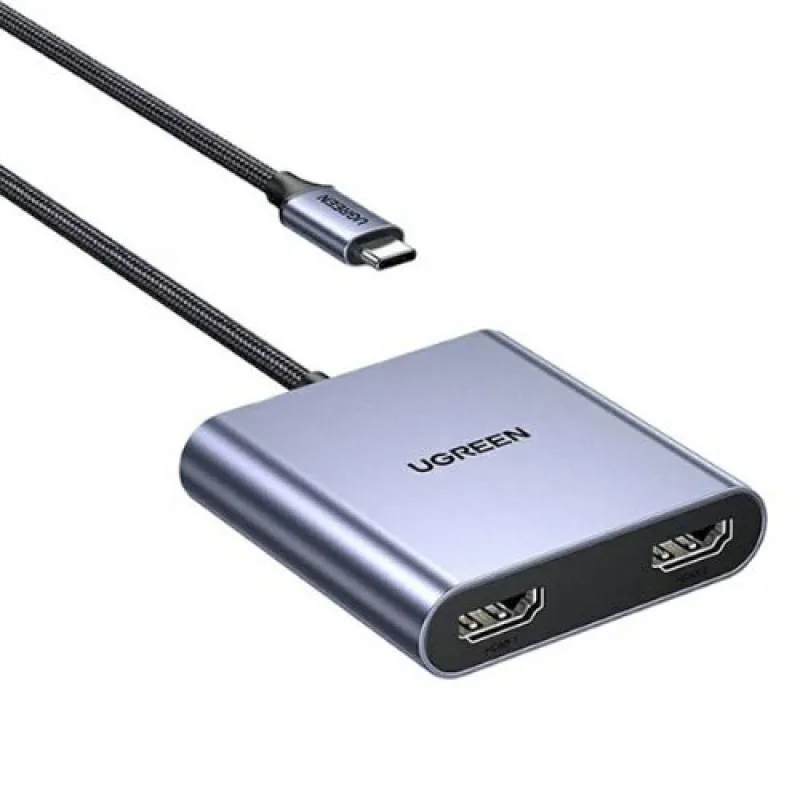
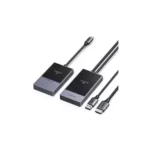
The UGREEN CM866 USB-C to Dual HDMI Adapter with 100W PD is a compact connectivity accessory designed to expand the display and charging capabilities of compatible laptops and other USB-C devices.
With two HDMI outputs, the adapter allows you to connect external monitors or displays for presentations, multitasking, office work and home entertainment. The compatible CM866 configuration also includes USB data connectivity and a USB-C Power Delivery input, helping reduce the need for multiple separate adapters.
Depending on the exact CM866 SKU, listed display capabilities include up to 4K at 30Hz for a single display or 1080p at 60Hz for two displays, alongside USB data transfer of up to 5Gbps and up to 100W PD input. These figures should be checked against the exact SKU supplied because CM866 listings vary by configuration.
Common Problems with Laptop Connectivity
Modern laptops often have a limited number of ports, making it difficult to connect multiple displays and accessories simultaneously.
Common challenges include:
- Not enough HDMI ports for external monitors
- Limited connectivity on slim laptops
- Difficulty setting up a multi-monitor workstation
- The need to connect USB accessories while using HDMI
- Wanting to charge a laptop while using an adapter
- Carrying several separate connectivity accessories
The UGREEN CM866 helps address these challenges by combining dual HDMI outputs, USB connectivity and power pass-through in one compact accessory.
Smart Solution: One Adapter for Multiple Connections
The UGREEN CM866 Dual HDMI Adapter expands a compatible USB-C port into additional display and connectivity options.
Use it to connect compatible external monitors, attach supported USB peripherals and connect a suitable USB-C PD charger through the adapter’s charging input.
Important: The host device must support USB-C video output, typically through DisplayPort Alt Mode. The adapter cannot add video output to a USB-C port that supports data only.
Key Features
1. Dual HDMI Display Outputs
The CM866 provides two HDMI female outputs for connecting compatible monitors, televisions or projectors.
This setup can help improve productivity by giving you additional screen space for documents, spreadsheets, presentations, editing and multitasking.
2. Up to 4K Resolution for a Single Display
The CM866 SKU 65144 is listed with single-display output of up to 4K at 30Hz. Actual resolution and refresh rate depend on the laptop, graphics hardware, HDMI cable and connected display.
3. Dual Display Support
For the 65144 configuration, retailer specifications list dual-display output of up to 1080p at 60Hz.
This can be useful for a productivity setup with two external monitors. The number of independent screens supported also depends on the host device and operating system.
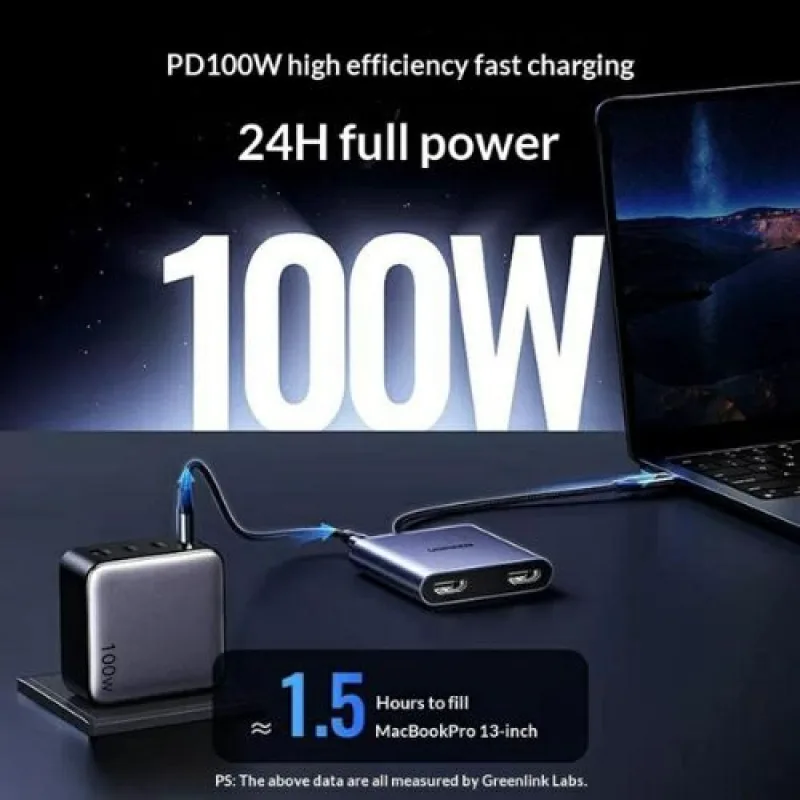
4. Up to 100W USB-C Power Delivery Input
The adapter includes a USB-C PD input that accepts up to 100W from a compatible charger.
This allows supported host devices to receive charging power while the adapter is in use. The actual power delivered to the laptop may be lower than 100W because the adapter consumes some power and the connected equipment must negotiate a compatible charging level.
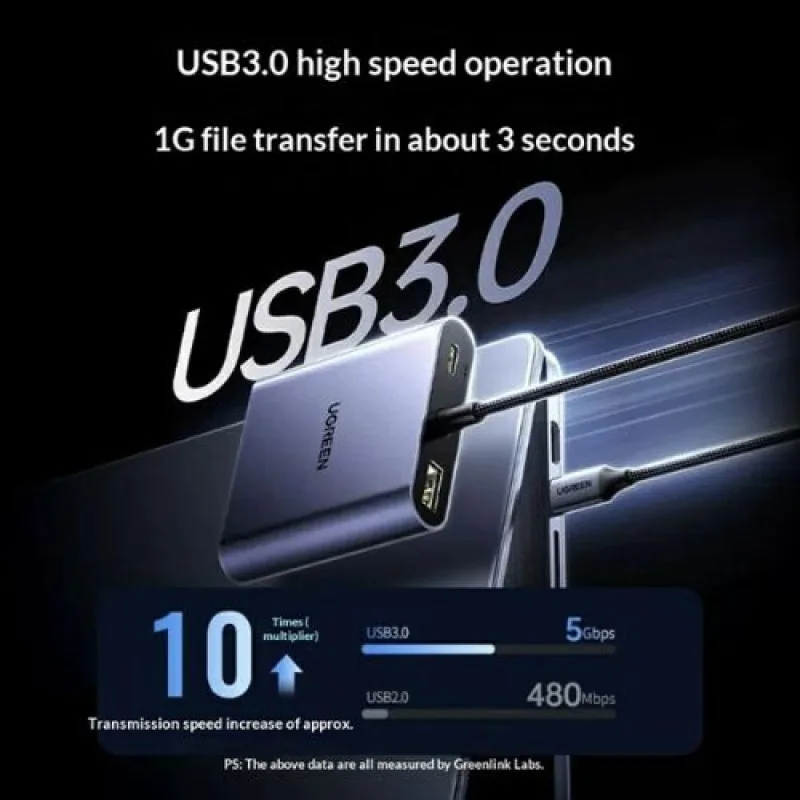
5. USB Data Transfer up to 5Gbps
The compatible CM866 configuration includes USB data connectivity with a listed transfer rate of up to 5Gbps.
This is useful for connecting supported peripherals such as USB flash drives, keyboards, mice and other compatible accessories. Actual transfer speeds vary by connected device and workload.
6. Compact and Portable Design
The compact adapter is suitable for office desks, home workstations, classrooms and travel. One Bangladesh listing specifies a cable length of approximately 20cm and a grey finish for the CM866 65144 version.
7. Multi-Operating-System Compatibility
The CM866 65144 listing identifies support for Windows, macOS and Linux. However, display-extension capabilities depend on the operating system, host hardware and graphics configuration.
8. Convenient Workstation Expansion
By combining HDMI connectivity, USB data access and PD charging input, the adapter can help simplify the cable setup for compatible laptops and portable workstations.
Benefits
- Two HDMI outputs for compatible displays
- Single-display output up to 4K at 30Hz on the 65144 version
- Dual-display output up to 1080p at 60Hz on the 65144 version
- USB data transfer up to 5Gbps on the listed configuration
- USB-C PD input up to 100W
- Supports compatible external monitors and projectors
- Helps expand laptop connectivity
- Compact design for travel and office use
- Reduces the need for multiple separate adapters
- Suitable for productivity and presentation setups
Perfect For
The UGREEN CM866 is suitable for:
- Office professionals
- Students
- Remote workers
- Programmers
- Designers
- Business presentations
- Home-office workstations
- Laptop users with compatible USB-C video output
- Users who need additional display connections
Why Choose UGREEN CM866?
The main advantage of the UGREEN CM866 USB-C to Dual HDMI Adapter is its combination of dual display connectivity and charging pass-through in a compact form.
Instead of relying on a single HDMI output, users with compatible hardware can connect two external displays while retaining access to supported USB data and power functions.
It is a practical option for users who want to expand their workstation without purchasing a full-size docking station.
UGREEN CM866 vs. a Basic USB-C to HDMI Adapter
| Feature | Basic USB-C to HDMI Adapter | UGREEN CM866 |
|---|---|---|
| HDMI Outputs | Usually 1 | 2 |
| External Display Options | Single display | Dual displays on supported systems |
| Single-Display Resolution | Depends on model | Up to 4K@30Hz on 65144 |
| Dual-Display Resolution | Not applicable | Up to 1080p@60Hz on 65144 |
| USB Data | Depends on model | Up to 5Gbps on listed configuration |
| USB-C PD Input | Depends on model | Up to 100W |
| Laptop Charging Pass-Through | Depends on model | Supported with compatible charger |
| Portable Design | Usually | Yes |
| Multi-Monitor Workstation | Limited | Suitable for compatible systems |
The specifications in this comparison refer to the listed CM866 65144 configuration; other CM866 variants may differ.
How to Use the UGREEN CM866 Adapter
Step 1: Check Your USB-C Port
Confirm that your laptop or device supports video output through USB-C, such as DisplayPort Alt Mode.
Step 2: Connect the Adapter
Insert the adapter’s USB-C host connector into the compatible USB-C port on your device.
Step 3: Connect Your HDMI Displays
Connect your monitors, television or projector to the HDMI outputs using suitable HDMI cables.
Step 4: Connect a PD Charger if Needed
Connect a compatible USB-C Power Delivery charger to the adapter’s PD input if you want to charge the host device during use.
Step 5: Configure Your Displays
Open your operating system’s display settings to select mirroring or extension where supported by your hardware and operating system.
Step 6: Connect USB Accessories
Connect compatible USB peripherals to the adapter’s USB data port, if included on your exact version.
Recommended Use Cases
Office Productivity
Use external monitors to keep documents, spreadsheets, email and business applications visible at the same time.
Programming and Development
A multi-monitor setup can help developers view code, documentation and testing tools simultaneously.
Graphic Design and Content Creation
Connect compatible displays to make room for design software, reference material and editing tools.
Business Presentations
Connect to compatible displays or projectors for meetings, lectures and presentations.
Home Office
Create a cleaner workstation using one adapter for supported display connections and power pass-through.
Study and Research
Use additional display space for online classes, research documents, notes and other study materials.
Cleaning & Maintenance
- Disconnect the adapter before cleaning.
- Wipe the exterior with a dry, soft cloth.
- Keep the connectors free from dust and moisture.
- Avoid pulling or bending the cable sharply.
- Store the adapter in a dry place when not in use.
- Do not expose it to liquids or excessive heat.
- Use compatible cables and power accessories.
Important Usage Tips
- Confirm the exact model number or SKU before purchase.
- Your USB-C port must support video output.
- A 100W PD input rating does not guarantee 100W delivery to the laptop.
- Display resolution and refresh rate depend on the host, cables and monitors.
- Dual-monitor extension depends on the laptop’s graphics hardware and operating system.
- Some Apple computers have limitations on the number of independently extended external displays; check your specific model before purchasing.
- Use a compatible USB-C PD charger if charging pass-through is required.
- Do not assume every CM866 listing has the same port layout or display specifications.
Compatibility note: Bangladesh listings identify CM866 variants including 65144 and 65145. Check the exact SKU, physical port layout and package description supplied by AIYOZON before publishing a fixed port count or resolution specification.
Product Specifications
| Specification | Details |
|---|---|
| Brand | UGREEN |
| Product Name | USB-C to Dual HDMI Adapter |
| Model | CM866 |
| SKU / Product Number | 65144 or 65145, depending on version |
| Host Connector | USB-C |
| Video Outputs | 2 × HDMI |
| Single-Display Resolution | Up to 4K@30Hz on SKU 65144 |
| Dual-Display Resolution | Up to 1080p@60Hz on SKU 65144 |
| USB Data Transfer | Up to 5Gbps on the listed configuration |
| Power Delivery | Up to 100W PD input |
| Cable Length | Approx. 20cm on SKU 65144 |
| Colour | Grey on SKU 65144 |
| Material | Varies by version; listings describe metal and plastic components |
| Compatibility | Windows, macOS and Linux listed; host video support required |
| Main Use | Dual-display connectivity and power pass-through |
Specifications are based on available CM866 retailer and product-catalogue information. Confirm the supplied SKU for exact dimensions, port layout, material and display modes.
What’s in the Box?
Typical package contents may include:
- 1 × UGREEN CM866 USB-C to Dual HDMI Adapter
- 1 × User Manual or product documentation
Package contents can vary by SKU and seller. Confirm whether the exact version includes any additional USB data ports or cables before ordering.
Who Should Buy This Product?
The UGREEN CM866 is a suitable choice for people who:
- Need to connect two external displays to a compatible USB-C device
- Want to expand a laptop workstation
- Need USB-C PD charging pass-through
- Use multiple displays for work or study
- Want a compact alternative to a larger docking station
- Need an adapter for presentations or office use
Before buying, make sure your computer supports the required number of external displays and the intended resolution.
Why Buy from AIYOZON?
When purchasing the UGREEN CM866 USB-C to Dual HDMI Adapter from AIYOZON, you can enjoy a convenient shopping experience for practical laptop and connectivity accessories.
AIYOZON Benefits
- Clear product specifications
- Convenient online ordering
- Product assistance before purchase
- Reliable delivery options
- Customer support
- Access to useful computer accessories
Frequently Asked Questions
What is the UGREEN CM866?
The UGREEN CM866 is a USB-C adapter designed to provide two HDMI outputs and, depending on the SKU, USB data connectivity and USB-C Power Delivery input.
Does the CM866 support 4K?
The CM866 65144 listing specifies up to 4K at 30Hz for one display. For two displays, it lists up to 1080p at 60Hz. Check the exact SKU before purchase.
Can I connect two monitors at once?
Yes, the adapter is designed for dual HDMI connections. Whether both displays can show separate extended desktops depends on your laptop, graphics hardware and operating system.
Does it support 100W charging?
The listed PD input accepts up to 100W from a compatible charger. The laptop may receive less than 100W after power negotiation and adapter consumption.
Will it work with any USB-C laptop?
No. The host USB-C port must support video output. A USB-C port used only for data or charging may not provide HDMI output.
Does it work with macOS?
CM866 listings include macOS compatibility, but external-display limits vary by Mac model. Verify the number of independent external displays supported by your specific computer before ordering.
What is the USB data speed?
The listed CM866 configuration supports USB data transfer of up to 5Gbps. Actual speed depends on the connected device and workload.
Are CM866 65144 and 65145 identical?
They are listed as related CM866 versions, but product pages differ in their descriptions and port configurations. Confirm the SKU and physical product details rather than assuming the specifications are identical.
Does the adapter include a charger?
The available listings describe a PD input port but do not establish that a compatible PD charger is included in every package. Check the seller’s box contents before purchasing.
Final Verdict
The UGREEN CM866 USB-C to Dual HDMI Adapter with 100W PD is a practical connectivity accessory for compatible laptops and workstations. Its dual HDMI outputs, USB data support and USB-C Power Delivery input can make it easier to build a multi-monitor workspace with fewer separate accessories.
For the listed 65144 version, the key specifications are up to 4K@30Hz on one display, up to 1080p@60Hz on two displays, USB data up to 5Gbps and up to 100W PD input. Confirm the exact SKU and host-device compatibility before ordering.
Expand Your Laptop Connectivity with UGREEN
- ✔ Dual HDMI display outputs
- ✔ Up to 4K@30Hz single-display output on SKU 65144
- ✔ Up to 1080p@60Hz dual-display output on SKU 65144
- ✔ Up to 5Gbps USB data transfer on the listed configuration
- ✔ Up to 100W USB-C PD input
- ✔ Compact design for office and travel
- ✔ Suitable for compatible USB-C laptops and workstations











Reviews
There are no reviews yet.